Noma Cloud Guide
Noma Cloud is the hosted workspace for shared Noma documents: research papers, books, documentation spaces, live rendered artifacts, permissioned editing, hybrid retrieval with exact citations, knowledge health, scoped agents, proofed patch review, connected sources, offline recovery, published reader sites, and a queryable SQLite-backed API.
What Noma Cloud is for
Use Noma Cloud when a .noma document should move beyond a local HTML file:
- collaborate on a paper, research memo, book, or documentation space
- keep multiple pages inside one workspace
- give viewers and editors different access
- share stable page, artifact, and published-site links
- let an agent patch a named block without rewriting the whole source
- discuss and approve changes at a stable block or saved document version
- manage delivery work with projects, issues, boards, backlog, and sprints in the same space
- expose a permission-aware query API for future Codex plugins and automation
The source remains plain Noma. The cloud layer adds persistence, users, permissions, share links, site membership, rendered artifacts, and the database index around that source.
Technical preview boundaries
The v0.17 Cloud release is a self-hosted technical preview, not a managed multi-tenant SaaS or a completed enterprise integration suite:
- Ask Noma uses deterministic local hybrid retrieval and extractive source
summaries. It does not call a hosted LLM or claim generative-answer quality.
- Connector endpoints persist permission, URL, hash, timestamp, and tombstone
lineage. OAuth clients, provider polling, and background synchronization workers are deployment-specific follow-up work.
- Recipe runs produce reviewable plans with a
proof_proposal_onlypolicy.
There is no built-in scheduler or autonomous worker loop.
- OIDC/SAML and SCIM routes are trusted-proxy and provisioning contracts. The
reverse proxy or identity gateway performs protocol validation before sending a shared-secret assertion to Noma.
- Realtime collaboration is an ordered, pollable operation feed with atomic
hash preconditions. It is not a WebSocket presence, cursor, or CRDT system.
- Retention and legal-hold cleanup currently cover platform metadata records.
Canonical documents, immutable revisions, and SQLite backup retention remain explicit operator responsibilities.
These boundaries keep launch claims aligned with the implementation while the retrieval, proof, permission, and source-portability contracts are evaluated with real teams.
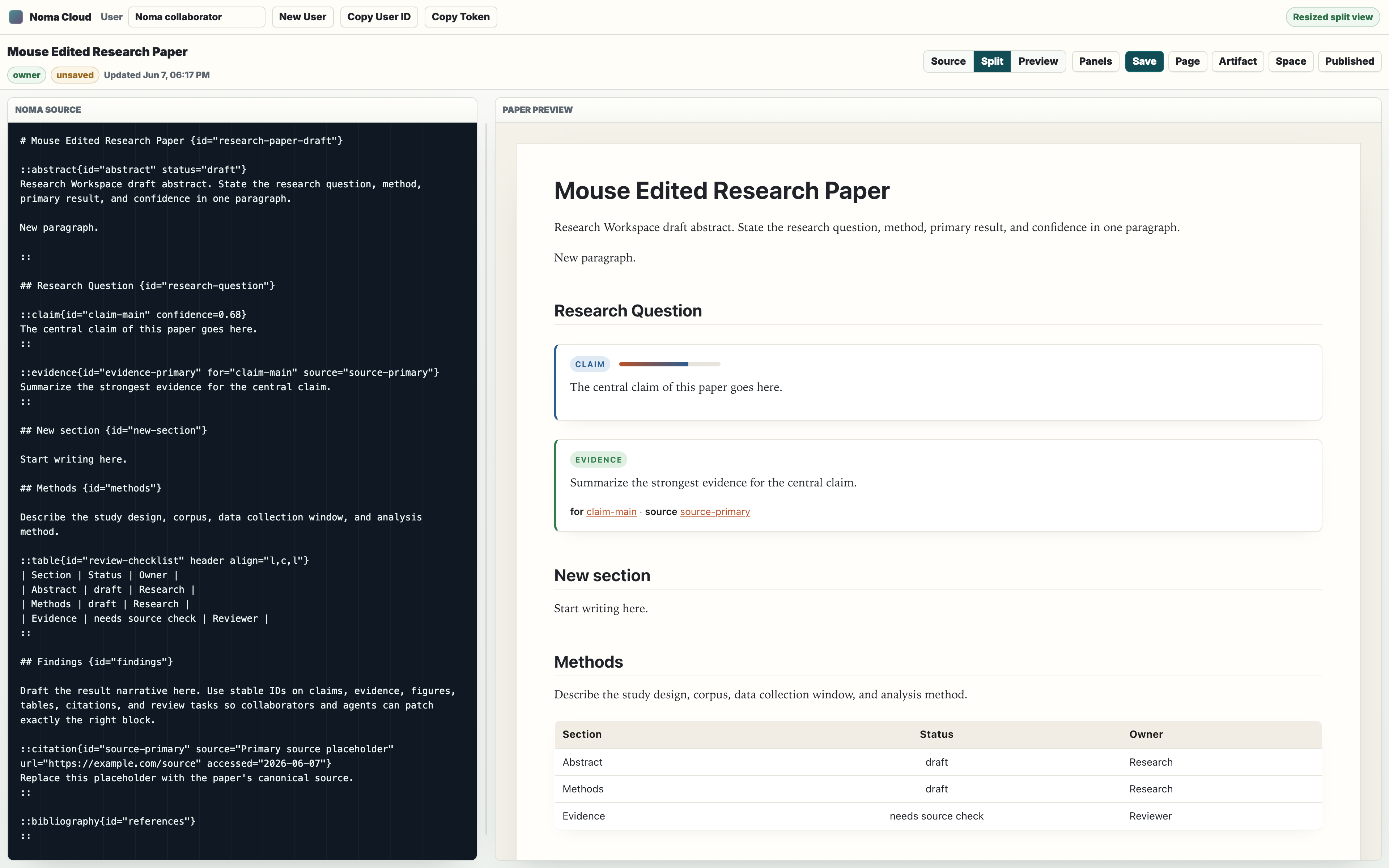
Run it locally
From a checkout:
npm install
npm run build:cloud
PORT=3000 npm start
open http://localhost:3000/cloud.html
The server stores runtime state in SQLite. By default it writes under the local cloud data directory configured by the server. In production, set a stable data directory or mount /data/noma so users, documents, sites, permissions, share links, and the block index survive container replacement.
Check the server:
curl http://localhost:3000/healthz
curl http://localhost:3000/api/status
Deploy with EZKeel from this repo:
npm run deploy:ezkeel:dry-run
npm run deploy:ezkeel
The EZKeel deployment uses Dockerfile, ezkeel.yaml, npm run build:cloud, node dist/cloud-server.js, and /data/noma as the storage root.
Attachment blobs live under <storage root>/blobs by default. To keep them in object storage instead, set NOMA_CLOUD_BLOB_STORE=s3 (see S3-compatible attachment storage).
Protect the cloud app
Production deployments must provide a global token gate for the cloud app and cloud APIs plus a separate invitation code for user registration:
NOMA_CLOUD_ACCESS_TOKEN_FILE=/data/noma/access-token \
NOMA_CLOUD_INVITATION_CODE_FILE=/data/noma/invitation-code \
NOMA_CLOUD_SSO_TRUST_SECRET=<reverse-proxy-to-Noma-shared-secret> \
npm start
Noma Cloud refuses to start with NODE_ENV=production when either secret is missing. A deliberately public deployment can opt out explicitly with NOMA_CLOUD_ALLOW_OPEN_ACCESS=1 and/or NOMA_CLOUD_ALLOW_OPEN_REGISTRATION=1. API requests are rate-limited by client address; deployments behind a trusted reverse proxy should set NOMA_CLOUD_TRUST_PROXY=1. NOMA_CLOUD_RATE_LIMIT_MAX, NOMA_CLOUD_AUTH_RATE_LIMIT_MAX, and NOMA_CLOUD_RATE_LIMIT_WINDOW_MS tune the defaults. Every request that carries ?access= -- including app-shell and static paths, not only /api/* -- counts against the stricter auth limiter, so the gate token cannot be brute-forced through /cloud?access=<guess>.
Set NOMA_CLOUD_ADMIN_USER_IDS (comma-separated user IDs) in production. With NODE_ENV=production and no allowlist, the server still starts but every /api/enterprise route returns 403 with code: "admin_not_configured" (fail closed). Outside production the first user ever registered is the bootstrap workspace admin.
Open the login page:
https://noma-cloud.apps.ezkeel.com/login.htmlThe login form validates the cloud access token, sets an HttpOnly cookie, and can exchange an existing Noma user token or personal access token for a browser session. New user registration is blocked unless the registration form includes the invitation code.
Browser sessions and CSRF
The web app never stores a raw token in localStorage. Login (POST /api/auth/session with userToken), registration (POST /api/auth/register), trusted SSO (POST /api/auth/sso), and OpenID Connect (GET /api/auth/oidc/callback) create a server-side session and set two cookies:
noma_session--HttpOnly; SameSite=Lax; Path=/; Max-Age=30 days, plus
Secure everywhere except localhost/127.0.0.1 over plain HTTP. Only the SHA-256 of the cookie is stored, with user, scopes, created, last-seen, expiry, user agent, and client address.
noma_csrf-- a readable double-submit token. Every cookie-authenticated
POST, PUT, PATCH, or DELETE must echo it in the X-Noma-CSRF header; the server compares it with the hash bound to the session and otherwise returns 403 with code: "csrf_required". GET /api/auth/session also returns the token (and re-issues one when the cookie was lost).
Bearer tokens (Authorization: Bearer ... or X-Noma-User-Token) keep working for API clients and agents and need no CSRF header; when both are present the bearer token wins. A browser that still has a token from an earlier build exchanges it for a session on first load and deletes it from storage.
GET    /api/auth/session            current principal, scopes, CSRF token
GET    /api/auth/sessions           own active sessions (?limit=&offset=)
DELETE /api/auth/sessions/<id>      revoke one of your sessions
POST   /api/auth/logout             revoke the current session, clear cookies
OpenID Connect login
Noma Cloud is a native OpenID Connect relying party. Point it at any standards-compliant IdP (Okta, Entra ID, Google Workspace, Auth0, Keycloak, Authentik, ...) and the login page and the app's top bar show a Sign in with <label> button. There are no extra dependencies: discovery, JWKS, PKCE and ID-token checks use node:crypto and fetch.
NOMA_CLOUD_OIDC_ISSUER=https://id.example.com \
NOMA_CLOUD_OIDC_CLIENT_ID=noma-cloud \
NOMA_CLOUD_OIDC_CLIENT_SECRET_FILE=/data/noma/oidc-client-secret \
NOMA_CLOUD_OIDC_REDIRECT_URL=https://wiki.example.com/api/auth/oidc/callback \
NOMA_CLOUD_OIDC_LABEL="Example ID" \
npm start| Variable | Meaning |
|---|---|
NOMA_CLOUD_OIDC_ISSUER | Issuer URL; discovery is read from <issuer>/.well-known/openid-configuration and its issuer must match |
NOMA_CLOUD_OIDC_CLIENT_ID | Client ID registered at the IdP |
NOMA_CLOUD_OIDC_CLIENT_SECRET / _FILE | Client secret, inline or from a file (set one, not both) |
NOMA_CLOUD_OIDC_REDIRECT_URL | Registered callback; defaults to NOMA_CLOUD_PUBLIC_URL + /api/auth/oidc/callback |
NOMA_CLOUD_OIDC_SCOPES | Space- or comma-separated scopes (default openid email profile; openid is always added) |
NOMA_CLOUD_OIDC_ALLOWED_DOMAINS | Comma-separated email domains; when set, only a verified email in one of them may sign in |
NOMA_CLOUD_OIDC_AUTO_PROVISION | 1 creates a Noma user on first login (default off: unknown identities get 403) |
NOMA_CLOUD_OIDC_LINK_BY_EMAIL | 1 links a first login to an existing user by verified email (default off, because Noma profile emails are self-asserted) |
NOMA_CLOUD_OIDC_REQUIRED_GROUP | Group that must appear in the groups claim |
NOMA_CLOUD_OIDC_GROUPS_CLAIM | Claim that carries groups (default groups) |
NOMA_CLOUD_OIDC_LABEL | Button label (default SSO) |
NOMA_CLOUD_OIDC_TOKEN_AUTH_METHOD | client_secret_basic or client_secret_post; default picks from discovery, preferring basic |
Setting any NOMA_CLOUD_OIDC_* variable without issuer, client ID, client secret, and a redirect URL stops the server at startup. The issuer, redirect URL, and discovered endpoints must be https (plain http only on loopback hosts).
GET /api/auth/providers                 sign-in methods for the login screens
GET /api/auth/oidc/start?returnTo=/...  sets the flow cookie, redirects to the IdP
GET /api/auth/oidc/callback             IdP redirect target; opens the session
The flow. /start creates state, nonce, and a PKCE verifier (S256) and seals them, with the return path, into noma_oidc_flow: an AES-256-GCM encrypted cookie (HttpOnly; SameSite=Lax; Path=/api/auth/oidc; Max-Age=600, Secure off loopback). /callback clears that cookie, checks state in constant time, exchanges the code at the token endpoint with the verifier, and verifies the ID token: only RS256/384/512, PS256/384/512, and ES256/384/512 signatures from the IdP JWKS are accepted (alg: none and HS* are refused), then iss, aud (and azp when there are several audiences), exp, iat, nbf with 60 seconds of clock skew, and nonce. Discovery and the JWKS are cached for an hour; a token signed with an unknown kid refetches the JWKS at most once a minute, so key rotation needs no restart. IdP calls time out after 10 seconds and responses are size-capped. The callback counts against the auth rate limiter like every /api/auth/* route.
Account mapping. The first match wins:
- an existing binding of this issuer +
subto a Noma user; - an active SCIM identity whose
externalIdequalssub; - with
NOMA_CLOUD_OIDC_LINK_BY_EMAIL=1, exactly one user whose email
equals the ID token's email, only when email_verified is true and that user is not already bound to a different subject at this issuer (turn this on to migrate token users, and only where you trust who set those emails);
- a new user (name from
name,preferred_username, or the email), only
with NOMA_CLOUD_OIDC_AUTO_PROVISION=1.
The match is stored as an (issuer, subject) binding, so later logins keep working when the email changes. The domain allowlist and required group are checked on every login. A user whose SCIM identities are all inactive is refused as deprovisioned. On success the callback opens the same noma_session + noma_csrf cookie session as every other login (source oidc, listed under GET /api/auth/sessions) and redirects to returnTo. Only same-origin paths are honoured; absolute, protocol-relative, backslash, and /api/ targets fall back to /cloud.html. An OIDC session also passes the cloud access gate, so SSO users never need the gate token. Failures render a short error page with the HTTP status (400 state/flow, 401 token, 403 policy, 502 IdP).
Enforced SSO. When workspace policy enforces SSO (/api/enterprise, sso.enforced), token login and self-registration return 403, and OIDC login satisfies the policy just like the trusted-header route. Enforcement can be switched on once either OIDC or NOMA_CLOUD_SSO_TRUST_SECRET is configured. With sso.provider: "oidc" and an sso.issuer, the configured issuer must match. With SCIM also enabled, first-login provisioning is off and every OIDC login needs an active SCIM identity for the user.
SAML is not native. Put a SAML-capable proxy (for example an IdP gateway or mod_auth_mellon) in front of Noma Cloud and use the trusted-header route: the proxy authenticates the user and calls POST /api/auth/sso with X-Noma-SSO-Trust-Secret and the SCIM externalId.
Personal access tokens
Scripts and agents should use named personal access tokens instead of the legacy per-user token. A token is shown once at creation, starts with noma_pat_, and is stored only as a hash with a short preview.
POST   /api/tokens                  {"name", "scopes": ["read"|"write"|"admin"], "expiresInDays"?: 1-365}
GET    /api/tokens                  own tokens with preview, scopes, expiry, lastUsedAt, active
DELETE /api/tokens/<id>             revoke; sessions opened with the token end too
POST   /api/users/me/rotate-token   replace the legacy token; other sessions are revoked
read is implied by every token. A token without write gets 403 (code: "insufficient_scope") on every mutating method except the read-only POST /api/db/query; /api/enterprise additionally needs admin. A token can only mint tokens within its own scopes, and rotating the legacy token needs admin. Expired or revoked tokens return 401 with token_expired or token_revoked. Signing in with a personal access token opens a session with the same scopes that ends no later than the token. Each user may hold 50 active tokens. The legacy token returned at registration still works with full scope, but it is deprecated for automation.
In the app, the header Security button opens a dialog with both lists. It shows your own tokens with name, preview, scopes, creation date, expiry, and last use, and a Revoke button for each. A form creates a token with a name, scopes from those your session holds (read is always on), and an expiry of 7, 30, 90, or 365 days, or none. The new secret is shown once with a Copy token button and is cleared when the dialog closes. The same dialog lists your signed-in browser sessions with how they started, when, last activity, user agent, and IP. The current browser is marked and cannot be revoked there (use Sign Out). Other sessions can be revoked one at a time or all at once with Sign out other sessions.
API clients must send the gate token separately from the normal Noma user token:
curl -H "X-Noma-Cloud-Access-Token: $NOMA_CLOUD_ACCESS_TOKEN" \
  -H "Authorization: Bearer $NOMA_TOKEN" \
  https://noma-cloud.apps.ezkeel.com/api/status
When the gate is enabled, cloud.html, the cloud editor assets, and /api/* return 401 without the access token. Browser visits to cloud.html redirect to login.html. Published document and site artifacts still require their own share tokens.
First workspace
After login, Noma Cloud uses a browser-stored Noma user token as the editing identity for API calls and UI permissions.
- Pass the deployment gate in
login.htmlwhen the server has a global access
token.
- In the Cloud header, enter a name and invitation code, then choose
Register. On deliberately open development deployments the invitation field can stay empty.
- To resume an existing identity, paste its user token in Token and choose
Log In. Sign Out clears that browser session without deleting data.
- Use Copy User ID when another owner needs to invite you.
- Use Security to create personal access tokens for your own API calls or
plugin development, and to review or revoke signed-in sessions.
- Registration creates a starter workspace and paper page automatically.
Choose New Space when you need another research, book, or docs space.
- Use New Page to add another paper section, chapter, or reference page,
then click pages in the left rail to switch documents.
The default first page is paper-oriented: abstract, research question, claim, evidence, methods, review table, findings, citation, bibliography, and review task. It is only a starter. Replace it with the structure your team needs.
Find, favorite, import, and recover content
The left rail provides workspace navigation beyond the page tree:
| Control | Behavior |
|---|---|
| Search | Hybrid lexical, semantic (local hash vector or a configured embedding model), typed-block, graph, trust, and freshness search over visible source blocks. Results preserve the exact source span, version hash, and access decision and open the matching page and source line. |
| Page template | Starts a new page from a built-in template (blank, meeting-notes, decision-record, project-overview, technical-spec, research-paper), a workspace template, or a template of the current space. Blueprints with variables open a form first. Manage lists every template and lets you edit or delete the ones you manage. |
| Draft with AI | Drafts a new page in the current space from a title and instructions. The draft becomes a page proposal under Agent Review. See generative-ai-on-the-trust-loop. |
| Import | Uploads .noma, .md, .markdown, or plain text into the current space. Markdown intake pins stable heading IDs. |
| Confluence | Imports a whole Confluence space into the current space. See wiki-macros-templates-import-export. |
| Favorite | Adds the current page to a per-user Favorites list. Spaces can be favorited from their context menu. |
| Recent | Tracks the pages and spaces opened by the current user. |
| Trash | Lists pages and spaces moved out of active navigation and restores them without losing source or document history. |
Search uses SQLite FTS5 plus deterministic local embeddings, typed metadata, wiki/trust edges, verification, and freshness. It always intersects results with the caller's page or space permissions. Trashed content is excluded from active lists, search, published spaces, and database queries. Moving a page to trash preserves its space membership so restoration returns it to the same workspace and folder.
Agents and integrations use the same lifecycle APIs:
GET    /api/search?q=<text>&site=<optional-site-id>&limit=25
GET    /api/knowledge/search?q=<text>&site=<optional-site-id>&limit=25
GET    /api/navigation
POST   /api/navigation/recent
PUT    /api/navigation/favorites
DELETE /api/navigation/favorites
GET    /api/templates
GET    /api/trash
POST   /api/trash/document/<id>
POST   /api/trash/document/<id>/restore
POST   /api/trash/site/<id>
POST   /api/trash/site/<id>/restore
When creating a page through /api/documents or /api/sites/<site-id>/documents, send templateId instead of source, or send format: "markdown" with Markdown source for server-side intake.
Wiki macros, templates, import, and export
Wiki macros
Pages can pull in live content with wiki macros. They are directives, so the source stays reviewable and agents can patch around them by block ID:
| Macro | What it shows |
|---|---|
::include{page="Title or id" block="block-id"} | One block of another page (or of this page, without page=). Without block= it includes the whole page. |
::include{page="..." excerpt} | The other page's ::excerpt. |
::excerpt | Marks this page's summary. The page tree and search results show it as summary. |
::children{depth=2 sort="title"} | Child pages from the space tree, with links and summaries. sort is position, title, or updated. |
::issue{key="ENG-12"} | A live card for a tracker issue: status, assignee, summary. |
::issues{project="ENG" status="in_progress"} | A table of matching issues. |
::page-properties / ::page-properties-report{label="adr"} | A key/value table, and a report of the properties of every page with that label in the space. |
Macros resolve when a page is rendered (/d/<id>, /s/<id>, /api/documents/<id>/html and /llm, exports) and in the editor preview. Every lookup is checked against the viewer. A page the viewer cannot open renders a "You do not have access" placeholder and nothing from it. A trashed or unknown page renders "not found". Includes nest at most three levels, and an include cycle renders a placeholder instead of recursing. At most 200 lookups run per render.
The editor preview renders unsaved source in the browser, so it asks the server in one batch:
POST /api/macros/resolve
{ "documentId": "<page id>", "requests": [
    { "kind": "include", "page": "Handbook", "block": "policy" },
    { "kind": "children", "documentId": "<page id>", "depth": 1, "sort": "title" },
    { "kind": "issue", "key": "ENG-12" },
    { "kind": "issues", "project": "ENG", "status": "todo", "limit": 20 },
    { "kind": "page-properties-report", "label": "adr" } ] }
The response has one result per request (status is ok, missing, forbidden, or unavailable). Included blocks come back as AST nodes with their IDs and line positions removed. At most 50 requests are answered per call, and every documentId / fromDocumentId must be a page the caller can view.
Templates and blueprints
Besides the built-in templates, a workspace can hold workspace templates (managed by workspace admins) and space templates (managed by editors of that space). A template is .noma source with {{variable}} placeholders. It can use title, title_id, space, date, and author without declaring them. Any other variable must be declared with a name, a label, an optional default, and required. A template that uses an undeclared placeholder is rejected.
GET    /api/templates?site=<optional-site-id>   built-ins + workspace + that space's templates
GET    /api/templates/<id>
POST   /api/templates                           { scope: "workspace"|"site", siteId?, name, description?, category?, source | fromDocumentId, variables? }
PUT    /api/templates/<id>
DELETE /api/templates/<id>
fromDocumentId saves an existing page as a template ("Save as template" in the page toolbar). The page's first heading becomes # {{title}} {id="{{title_id}}"}, so each new page gets its own title and ID. To create a page from a blueprint, send templateId and variables to POST /api/sites/<id>/documents. Space templates can only be used inside their own space. Missing required variables return 400 with a missing list.
In the app, Manage next to the page template picker lists built-in, workspace, and space templates. Templates you can manage (workspace templates for workspace owners, space templates for that space's editors) have Edit and Delete buttons. Edit changes the name, description, category, source, and declared variables (name, label, default, required). Server validation errors, such as an undeclared placeholder, are shown in the dialog. Built-in templates are read-only.
Values are filled in so they cannot change the page's structure. Values become one line. Inside attributes, quotes and braces are neutralised. In YAML frontmatter, values are quoted. If a value would turn a line into a heading, list, directive, fence, or attribute block, a zero-width space is placed in front of it so it stays plain text.
Import from Confluence
POST /api/import/confluence imports a whole Confluence space into an existing Noma space. The caller needs editor access to that space. The request returns 202 with a job, and the import runs in the background:
POST /api/import/confluence   { siteId, deployment: "cloud", baseUrl, email, apiToken, spaceKey, overwrite? }
POST /api/import/confluence   { siteId, deployment: "datacenter", baseUrl, pat, spaceKey, overwrite? }
POST /api/import/confluence?site=<id>&overwrite=false   (body: XML space export .zip, or entities.xml)
POST /api/import/confluence   { siteId, archiveBase64 } | { siteId, entitiesXml } | { siteId, bundle }
GET /api/import/jobs/<job-id>- Live import reads every current page of the space through the Confluence
Cloud v2 REST API (email + API token) or the Data Center REST API (personal access token), following pagination. Credentials are used for that one job and never stored or returned. The target must be https and resolve to a public address. Each request resolves the host once, checks every answer against the private-address guard, and pins the connection to the checked address, so a DNS answer that changes after the check (DNS rebinding) cannot reach an internal host. TLS still verifies the certificate for the hostname. Redirects are refused. Set NOMA_CLOUD_IMPORT_ALLOW_PRIVATE_HOSTS=1 only for a self-hosted Data Center on a private network.
- XML space export accepts the ZIP from *Space settings → Export space →
XML*, or its entities.xml. Only current pages are imported: historical versions, drafts, and deleted pages are skipped. XML entities are never expanded. An HTML export is rejected with a hint to export XML instead. Uploads are capped by NOMA_CLOUD_IMPORT_MAX_BYTES (default 50 MB).
- JSON bundle (
format: "noma-confluence-bundle") takes pages withid,
title, parentId, storage (storage-format XHTML), labels, and optional attachments: [{ filename, dataBase64, id?, mediaType? }].
Storage format becomes .noma: headings (shifted one level under the page title, with explicit IDs), paragraphs, lists, task lists, tables, code and noformat blocks, info/note/warning/tip/panel callouts, expand sections, status lozenges, page links (as [[wikilinks]]), images (as ::figure), and the excerpt, include, excerpt-include, children, Jira-issue, page-properties, and page-properties-report macros (as the Noma macros above). Other macros are kept as readable text in a ::confluence_macro block and counted in the job's loss report.
Attachments are copied into Noma Cloud as page attachments:
| Source | Where the bytes come from |
|---|---|
| Live import | /rest/api/content/<pageId>/child/attachment (paginated), downloaded from each file's _links.download with the job's credentials and the same pinned, redirect-refusing transport as page fetches |
| XML export ZIP | attachments/<pageId>/<attachmentId>/<version> inside the archive, matched through the Attachment objects in entities.xml (current versions only) |
entities.xml alone | none; references keep their links and the result says to upload the whole ZIP |
| JSON bundle | base64 attachments on each page |
Copied files go through the same checks as uploads: the per-file limit (NOMA_CLOUD_MAX_ATTACHMENT_BYTES), magic-byte sniffing with executables refused, and the space's attachment quota (NOMA_CLOUD_ATTACHMENT_QUOTA_BYTES). One import reads at most NOMA_CLOUD_IMPORT_MAX_BYTES of attachment bytes. Images (ri:attachment in ac:image) become ::figure{src="att:<id>"} and attachment links become [label](att:<id>), so they resolve to signed URLs like any other page attachment. Files that cannot be copied keep their original Confluence download URL (or attachments/<pageId>/<file> for file exports). The job result's attachments block reports referenced, copied, reused, skipped, and bytesCopied, plus skippedDetails with each skipped file and why (too large, over the import budget or quota, executable, download failed, not in the source). Re-importing is idempotent for attachments too: a file already on the page with the same name and content hash is reused, not stored again, and blobs are content-addressed.
Each page keeps its Confluence ID, space, URL, author, dates, and version in frontmatter (source: confluence). The parent/child hierarchy becomes the space's page tree, and Confluence labels become page labels. Re-importing is idempotent: pages are matched by Confluence page ID. Unchanged pages are left alone, and changed pages get a new revision. A page edited in Noma since the last import is skipped unless overwrite: true. The job status reports total, processed, created, updated, unchanged, skipped, failed, attachmentsCopied, and attachmentsSkipped counts, with a per-page result list. Only the job's creator or an editor of the space can read it. Only one import per space runs at a time. Jobs interrupted by a server restart are marked failed.
Import from Notion
POST /api/import/notion imports a Notion workspace (or any part of it) into an existing Noma space, with the same job model as the Confluence import: editor access to the space, a 202 job, GET /api/import/jobs/<job-id> polling, and one import per space at a time.
POST /api/import/notion?site=<id>&overwrite=false   (body: Notion "Markdown & CSV" export .zip)
POST /api/import/notion   { siteId, archiveBase64, overwrite? }
POST /api/import/notion { siteId, bundle, overwrite? }- Export ZIP is the file from Settings → Export → Markdown & CSV (include
subpages and files). Pages are Title <id>.md, child pages live in the folder Title <id>/, and databases are Name <id>.csv (the _all.csv variant wins when both exist) with their row pages in Name <id>/. Large exports that wrap Part-N.zip files are unpacked one level deep. The upload is capped by NOMA_CLOUD_IMPORT_MAX_BYTES, the archive by entry count and inflated size, and the import by 2,000 pages. Entries with absolute or .. paths are skipped and listed in the result.
- JSON bundle (
format: "noma-notion-bundle", optional) is for pipelines
that read the Notion API block tree themselves: { workspace?, pages: [{ id,
title, parentId?, markdown, properties?, url?, database?: { columns, rows }
}] }. markdown uses Notion's export dialect. Links to notion.so URLs or bare page IDs become wikilinks. Bundles carry no files.
Each page becomes one .noma document with source: notion frontmatter (the Notion ID and URL). Folders become the page tree. Links to other imported pages (relative .md/.csv paths or notion.so URLs) become [[Title]] wikilinks. Images and files in the export are stored as page attachments. A standalone image becomes ::figure{src="att:<file>"} and other files become [name](att:<file>) links. Attachment size and space quota limits apply, and a file that is too large or executable is skipped and listed in the result. Notion callouts (<aside>) become ::callout blocks. A database becomes a page with a readable pipe table (row titles link to their row pages) plus a ::dataset{format="csv"} copy that agents and plots can use. A row page's properties (the Key: value lines under its title) become a ::page-properties block, so ::page-properties-report can list them. A Tags or Labels property becomes page labels. Literal :: lines and [[...]] text from Notion are neutralised with a zero-width space so they stay plain text.
The job's loss report counts what did not carry over exactly: raw HTML (html), links to pages or files missing from the export (broken-link, missing-file), titles that cannot be a wikilink target (unlinkable-title), duplicate titles, and oversized files. Re-importing matches pages by Notion ID. It follows the same unchanged / updated / skipped-unless-overwrite rules as the Confluence import. Attachments whose name and bytes are unchanged are kept, and changed files replace the old attachment. Wikilinks resolve by title, so two imported pages with the same title link to whichever the space finds first.
The CLI converts the same exports offline: noma ingest export.zip --from notion --out wiki/ writes one .noma file per page in a folder tree, files under <page>.files/, and a notion-import-report.json with the loss report.
Export
GET /api/documents/<id>/export?to= downloads one page as pdf, docx, markdown, html, noma, llm, or json. Macros are resolved for the viewer. HTML and PDF render with escape hatches and external assets off. PDF export needs Puppeteer and its Chrome build on the server. Without them it returns 501 with code: "pdf_unavailable". At most two PDF exports run at once.
GET /api/sites/<id>/export?to=site-zip downloads the space as a static HTML site: an index.html page tree plus one page per document, with child-page links rewritten to the exported files. ?to=noma-zip downloads the .noma sources, a manifest.json (IDs, titles, parents, folders, labels, hashes), and a book.noma.yml manifest, so noma render book.noma.yml --to site works offline. The page toolbar's Export menu offers both.
Page tree, labels, watching, and version diffs
Spaces organise pages as a tree, the way wiki users expect:
| Control | Behavior |
|---|---|
| Page tree | Pages nest under parent pages. The rail indents children beneath their parent; the page header shows breadcrumbs back to the space. Right-click a page for Add child page or Move under page.... |
| Labels | Lowercase, hyphenated tags on a page (how-to, onboarding). Editors add and remove them from the page header; everyone with access can list pages by label. |
| Watch | Creators and editors automatically watch the pages they touch. Watchers of a page, or of its whole space, get a page_updated notification whenever someone else changes it. |
| Diff | Each saved version in History has a Diff button that shows the line diff against the previous version plus the stable block IDs that were added, removed, or changed. |
| Delete forever | Owners can permanently purge a page or space that is already in the trash, unless a legal hold covers it. |
The tree is stored per space as a pageParents map (child page → parent page). Parents must be pages in the same space and cycles are rejected. When a parent page is trashed its children move up to the nearest visible ancestor; restoring the parent puts them back.
GET    /api/sites/<site-id>/tree
GET    /api/sites/<site-id>/documents/<page-id>/breadcrumbs
PUT    /api/sites/<site-id>/documents/<page-id>/parent     {"parentId": "<id>|null", "position": 0}
POST   /api/sites/<site-id>/documents                      {"title": "...", "parentId": "<id>"}
GET    /api/documents/<id>/labels
PUT    /api/documents/<id>/labels                          {"labels": ["how-to", "onboarding"]}
POST   /api/documents/<id>/labels                          {"label": "how-to"}
DELETE /api/documents/<id>/labels/<label>
GET    /api/labels?site=<optional-site-id>
GET    /api/labels/<label>?site=<optional-site-id>
GET    /api/documents/<id>/watch
PUT    /api/documents/<id>/watch
DELETE /api/documents/<id>/watch
PUT    /api/sites/<site-id>/watch
GET    /api/documents/<id>/revisions/<n>/diff?against=<m>
DELETE /api/trash/<document|site>/<id>
Search filters and query syntax
Both search endpoints accept a small query language inside q, and the same filters as query parameters. Filters narrow the permitted corpus before ranking, so results never widen beyond the caller's access.
| Filter | In q | Parameter | Matches |
|---|---|---|---|
| Label | label:how-to | label=how-to | Pages carrying the label; repeat for AND. |
| Author | author:@ada, author:me | author=<name or user ID> | Pages created or updated by the user, including any saved revision. |
| Space | space:ENG | space=<key, ID, slug, or title> | Pages in that space. |
| Updated | after:2026-01-01, before:2026-07-01 | updatedAfter=, updatedBefore= | Last update on or after / strictly before the instant. |
| Type | type:page, type:claim, type:section | type= | page keeps the best block per page; anything else matches a block type or directive name. |
| Phrase | "exact phrase" | The words must appear together, in order. |
A query made only of filters (for example label:how-to space:ENG) lists the matching pages, most recently updated first. Unknown key:value tokens are searched as plain text. /api/knowledge/search returns mode: "filter" for filter-only queries and echoes the interpreted filters as filters so clients can render chips. The Cloud search panel has type, date, label, and author dropdowns plus removable chips for filters typed into the box.
GET /api/search?q=deploy+label:how-to+author:@ada+"blue green"
GET /api/knowledge/search?q=rollback&space=ENG&type=decision&updatedAfter=2026-06-01
Mentions
Type @ in a comment box or in the source editor to open the mention picker. It searches only people who share at least one space with you, so the picker never exposes the whole user directory. Choosing someone inserts the stable source form @{user-id}; comments and the paper preview display it as @Name, while the source keeps the ID so renames never break a mention.
- A mention in a comment notifies the mentioned user if they can open the page.
- A mention in page source notifies on save, but only for mentions that were
not already in the previous version, and only for users who can open the page. Mentions inside fenced code blocks are ignored.
- Comment responses carry a
mentionsarray of{id, name}for display.
GET /api/users?q=<name prefix>&document=<optional page id>&limit=10
GET /api/users?ids=<id,id,...>&document=<optional page id>
q returns {id, name} for co-members of your spaces (plus yourself); document= narrows the list to people who can open that page. ids= resolves display names for mentions and returns only people you share a space with, or people who can open the given page.
Space keys, home pages, and archiving
Every new space gets a unique uppercase key (2–10 letters or digits, starting with a letter). Pass key when creating a space, or Noma derives one from the title (Engineering Handbook → EH, then EH2). Keys are unique across the workspace; a clash returns 409 space_key_taken. Only space owners can change a key. Search accepts keys in space:ENG.
| Setting | Behavior |
|---|---|
description | Up to 2,000 characters, shown under the title on the published space. |
icon | An emoji or up to 8 plain characters shown beside the title. |
homeDocumentId | A page in the space. The app opens it when you enter the space, and /s/<id> renders it first. |
| Archive | Owners archive a space to make it read-only. Archived spaces are hidden from GET /api/sites unless ?archived=include (or only) and their pages are left out of search unless the query says archived:include or names the space. Every write to the space or to a page that lives only in archived spaces returns 409 space_archived; reading, watching, and unarchiving still work. |
The Space settings panel edits these fields; the Spaces rail has an Archived toggle to list archived spaces.
POST /api/sites                       {"title": "Engineering", "key": "ENG", "description": "...", "icon": "🛠️", "documentIds": []}
PUT  /api/sites/<site-id>             {"key": "BUILD", "description": "...", "icon": null, "homeDocumentId": "<page-id>"}
GET  /api/sites?archived=exclude|include|only
POST /api/sites/<site-id>/archive
POST /api/sites/<site-id>/unarchive
GET  /s/<site-id>
Page analytics
The app sends a view beacon when a page opens, and opening a rendered page at /d/<id> counts as a view too. Views are deduplicated per viewer per page for 30 minutes. Share-link views are anonymous: they are keyed by a hash of the link and client address, and never linked to a user. Views older than about 400 days are pruned.
The page header shows N views (last 30 days). Clicking it shows views per day and, for page editors and owners only, who viewed the page. The rail lists the most viewed pages of the current space.
POST /api/documents/<id>/views
GET  /api/documents/<id>/analytics?days=30
GET  /api/sites/<site-id>/documents/<page-id>/analytics?days=30
GET  /api/sites/<site-id>/popular?days=30&limit=10
analytics returns totalViews, uniqueViewers (signed-in people), anonymousViews, and viewsByDay. It includes viewers (name, view count, last view) only when the caller is a signed-in editor or owner of the page. popular ranks the space's non-trashed pages by views, then unique viewers.
Reorder the page tree
Editors can drag a page in the rail and drop it on another page: the top edge drops it before that page, the bottom edge after it, and the middle makes it a child. The same moves are available without a mouse:
| Move | Keyboard (focused page) | Context menu |
|---|---|---|
| Up among siblings | Alt+↑ | Move up |
| Down among siblings | Alt+↓ | Move down |
| Indent under the page above | Alt+→ | Indent |
| Outdent next to its parent | Alt+← | Outdent |
All of these call PUT /api/sites/<site-id>/documents/<page-id>/parent with parentId and position (the index among the new siblings). A position at or past the end appends the page after the last sibling and its subpages.
Inline tasks
A top-level list item that starts with a checkbox is a tracked task:
- [ ] Draft the launch plan @{user-id} due:2026-10-01
- [x] Book the room- The first mention is the assignee;
due:YYYY-MM-DDis the due date. - When a person saves a page (create, or
PUTthe page), every checkbox item
without an ID gets a stable marker in the source, for example - {#task-k3v9x2ab} [ ] Draft the launch plan …. The marker never changes afterwards, so the task keeps its identity when its text is edited or moved. Agent patches are never rewritten; their new tasks get IDs on the next human save.
- Every save re-indexes the page's tasks. People newly assigned a task get a
task_assigned notification if they can open the page.
- Completing a task flips only that list item's checkbox through a block-level
replace_body patch. Pass the task's blockHash as baseHash so a task that changed since you loaded it returns 409 task_changed instead of being overwritten. Editors can complete any task; a viewer can complete tasks assigned to them.
The rail's My tasks list shows your open tasks across spaces, overdue ones highlighted, with a checkbox to complete them. In the preview, task checkboxes are clickable once the page is saved.
GET  /api/tasks?assignee=me|any|<user-id>&status=open|done|all&site=<id>&document=<id>&limit=100
GET  /api/documents/<id>/tasks
GET  /api/documents/<id>/tasks/<task-id>
POST /api/documents/<id>/tasks/<task-id>        {"done": true, "baseHash": "<blockHash>"}
Task responses include title (text without the mention or due marker), status, assigneeId, dueDate, overdue, completedAt, completedBy, and blockHash. Tasks on trashed pages, and on pages that live only in archived spaces, are left out of /api/tasks.
Outbound webhooks
Space owners can send space events to other systems. Each webhook has a target URL, a list of events, a format, and a signing secret.
| Event | Sent when |
|---|---|
page.created | A page is created in the space. |
page.updated | A page's source changes, by a person or an applied agent patch. |
page.deleted | A page is moved to trash. |
comment.created | Someone comments on or replies to a page. |
label.changed | A page's labels change (labels, added, removed). |
task.completed | An inline task is checked off (task). |
Deliveries are JSON with id, event, createdAt, space, page, actor, and event data. Each request carries x-noma-event, x-noma-delivery, x-noma-timestamp, and x-noma-signature: sha256=<hex>, the HMAC-SHA256 of <timestamp>.<raw body> with the webhook secret. The secret is returned only when the webhook is created; pass your own secret (16–256 characters) or let Noma generate one. With format: "slack" the body is {"text": "..."} for a Slack incoming webhook.
Deliveries are queued in SQLite and sent by an in-process timer (NOMA_CLOUD_QUEUE_INTERVAL_MS, default 5000; 0 disables it) or by one run of npx tsx apps/worker/cloud-queue.ts. Any 2xx response is success. Other responses and network errors retry after 30s, 1m, 2m, and so on, up to 6 hours apart, for 8 attempts in total; after that the delivery is marked failed. Retries reuse the delivery ID so receivers can deduplicate.
Pages under a view restriction (their own or an inherited one) never emit webhook events, so restricted titles and IDs do not leave the workspace. Search filters, the people directory, popular pages, My tasks, mention and task notifications, and digests all apply the same view restrictions as the page itself.
SSRF protection. Webhook URLs must be http or https without credentials. URLs pointing at loopback, private (RFC 1918), link-local (including cloud metadata), CGNAT, multicast, or unique-local IPv6 addresses are rejected, and every delivery re-checks the resolved addresses before connecting, so DNS rebinding cannot reach internal hosts. Set NOMA_CLOUD_ALLOW_PRIVATE_WEBHOOKS=1 only for on-premises targets.
GET    /api/sites/<site-id>/webhooks
POST   /api/sites/<site-id>/webhooks                 {"url": "https://...", "events": ["page.updated"], "format": "json", "secret": "optional"}
GET    /api/sites/<site-id>/webhooks/<webhook-id>
DELETE /api/sites/<site-id>/webhooks/<webhook-id>
GET    /api/sites/<site-id>/webhooks/<webhook-id>/deliveries?limit=50
The Space settings panel has a Webhooks section for owners.
Email, notification preferences, and digests
Each person chooses, per notification type (mention, comment, approval_requested, approval_updated, page_updated, task_assigned), whether it is shown in app only (the default), in app and by email, or off (not recorded at all). A daily or weekly digest emails a summary of notifications that are still unread; nothing is sent when everything is read. The first digest arrives one full period after it is turned on.
Email needs an address on the profile. It is visible only to its owner: GET /api/users and the DB API never return it.
GET /api/users/me
PUT /api/users/me                      {"email": "ada@example.com", "name": "Ada"}   (email null clears it)
GET /api/users/me/preferences
PUT /api/users/me/preferences          {"channels": {"mention": "email", "comment": "off"}, "digest": "daily|weekly|off"}
Mail goes through a persisted outbox drained by the same background queue as webhooks. Transient failures retry after 1, 2, 4, and 8 minutes; SMTP 5xx replies fail immediately.
| Setting | Behavior |
|---|---|
NOMA_CLOUD_SMTP_URL | smtp://user:pass@host:587 uses STARTTLS when the server offers it (?starttls=required to insist, ?starttls=never to skip). smtps://host:465 uses implicit TLS. Credentials are sent with AUTH PLAIN or LOGIN, and only over TLS. ?insecure=1 skips certificate checks and allows AUTH without TLS; use it for local testing only. |
NOMA_CLOUD_MAIL_TRANSPORT=log | Development transport: writes each message as a JSON line to NOMA_CLOUD_MAIL_LOG, or to stdout. It is also used when no SMTP URL is set. |
NOMA_CLOUD_MAIL_FROM | Sender, default Noma Cloud <noreply@localhost>. |
NOMA_CLOUD_PUBLIC_URL | Base URL for links in emails. |
The Notifications panel has a Notification settings section for the email address, per-type channels, and the digest frequency.
Attachments and images
Pages can carry files: screenshots, PDFs, spreadsheets, and exports. Upload from the Attachments panel in the inspector, or drop or paste files straight into the source editor. Images are inserted at the cursor as a figure, and other files as a link:
::figure{src="att:<attachment-id>" alt="Growth chart"}
::

Read the [spec](att:<attachment-id>) or refer to a file by name: [spec](att:spec.pdf).
The reference stays in the .noma source, so pages still round-trip through source with stable IDs. When Noma Cloud renders a page (the preview, /d/<id>, /api/documents/<id>/html, and the published /s/<id> site), it maps each att: reference to a short-lived signed URL. That URL is bound to the viewer and is checked again on every request. An att: reference resolves only against the same page's attachments, so one page cannot embed another page's files. A reference that does not resolve renders as a placeholder.
| Behavior | Detail |
|---|---|
| Storage | Content-addressed blobs keyed by SHA-256, laid out as blobs/ab/cd/<sha256>. Identical uploads share one blob. Uploads stream to a local temp file while they are hashed and checked, then move into the blob store. The default store is the local disk under <storage root>/blobs. Set NOMA_CLOUD_BLOB_STORE=s3 to keep blobs in S3 or an S3-compatible service instead (see below). |
| Limits | 25 MB per file (NOMA_CLOUD_MAX_ATTACHMENT_BYTES). 1 GB of live attachments per space, or per uploader for pages outside a space (NOMA_CLOUD_ATTACHMENT_QUOTA_BYTES). Over the limit, the server returns 413 with code attachment_too_large or attachment_quota_exceeded. |
| Content type | Taken from the file's magic bytes, not the declared type. Executables (PE, ELF, Mach-O, shebang scripts, and executable extensions) are rejected with 415. Filenames lose directory parts and control characters. |
| Serving | x-content-type-options: nosniff, CSP sandbox, and an ETag. PNG, JPEG, GIF, WebP, and PDF are served inline. Everything else downloads as an attachment. SVG, HTML, and XML are always sent as application/octet-stream. |
| Permissions | Viewers of a page can list and download its attachments. This includes page share links and space share links that reach the page. Editors upload and delete. Page restrictions apply to attachments too. |
| Lifecycle | Deleting an attachment hides it. Purging the page from trash removes its attachment rows and any blob that no other page still references. |
| Search and backup | Filenames are indexed as attachment rows in /api/search. /api/backup/export embeds attachments, base64 encoded and hash-checked, up to 50 MB (pass includeAttachments: false to skip them). Import restores them for pages the importer can edit. |
POST   /api/documents/<id>/attachments               raw body (content-type + x-filename) or multipart/form-data
GET    /api/documents/<id>/attachments
DELETE /api/documents/<id>/attachments/<attachment-id>
GET    /api/attachments/<attachment-id>              bearer/share access, or ?exp=&p=&sig= signed URL
An upload is either the raw file bytes, with content-type and a URL-encoded x-filename header, or a multipart/form-data body. A multipart body needs exactly one file part named file. Optional filename or name text fields set the stored name. Without them, the file part's own filename is used. The file part's content-type is the declared type. Other fields are ignored. The parser streams the file part into staging and never buffers the whole body. The same size limit, quota, and magic-byte checks apply to both upload styles.
curl -H "Authorization: Bearer $NOMA_CLOUD_TOKEN" \
  -F "file=@chart.png;type=image/png" -F "filename=Q3 chart.png" \
https://wiki.example.com/api/documents/<id>/attachments| Multipart error | Status | Code |
|---|---|---|
No part named file | 400 | attachment_multipart_missing_file |
Missing or invalid boundary, a body that does not use it, no closing boundary, bad part headers, a second file part, more than 16 parts, or a text field over 4 KB | 400 | attachment_multipart_malformed |
File part larger than NOMA_CLOUD_MAX_ATTACHMENT_BYTES | 413 | attachment_too_large |
S3-compatible attachment storage
NOMA_CLOUD_BLOB_STORE=s3 stores attachment blobs in AWS S3 or any S3-compatible service, such as MinIO, Cloudflare R2, or Hetzner Object Storage. The driver has no dependencies. It signs requests with AWS Signature V4 using node:crypto and sends them with the built-in fetch.
- Upload. Each upload is still staged on local disk first, so it can be
hashed, sniffed, and checked against the quota. Commit sends a HeadObject and skips the upload when the blob already exists. Otherwise it streams a PutObject from the staged file.
- Integrity. The signed
x-amz-content-sha256header is the blob's
SHA-256, the same value as its key. The service rejects any body that does not match it.
- Download. Downloads stream from
GetObject. Deleting a blob during
garbage collection sends DeleteObject.
- Keys. Object keys are
<prefix>blobs/ab/cd/<sha256>.
| Variable | Meaning |
|---|---|
NOMA_CLOUD_BLOB_STORE | local (default) or s3. |
NOMA_CLOUD_S3_BUCKET | Bucket name. Required for s3. |
NOMA_CLOUD_S3_REGION | Signing region, falling back to AWS_REGION or AWS_DEFAULT_REGION. Required for AWS. With a custom endpoint it defaults to us-east-1. Use auto for R2. |
NOMA_CLOUD_S3_ENDPOINT | Custom endpoint, for example http://minio:9000, https://<account>.r2.cloudflarestorage.com, or https://fsn1.your-objectstorage.com. Falls back to AWS_ENDPOINT_URL_S3 or AWS_ENDPOINT_URL. When unset, the AWS endpoint for the region is used. |
NOMA_CLOUD_S3_FORCE_PATH_STYLE | 1 for path-style URLs (<endpoint>/<bucket>/<key>) and 0 for virtual-hosted URLs (<bucket>.<host>/<key>). Defaults to path-style with a custom endpoint and virtual-hosted on AWS. |
NOMA_CLOUD_S3_PREFIX | Key prefix, for example noma/prod/, to share one bucket between deployments. |
NOMA_CLOUD_S3_ACCESS_KEY_ID, NOMA_CLOUD_S3_SECRET_ACCESS_KEY | Credentials. Either one can be read from a file with the _FILE suffix. Falls back to AWS_ACCESS_KEY_ID and AWS_SECRET_ACCESS_KEY. |
NOMA_CLOUD_S3_SESSION_TOKEN | Optional session token for temporary credentials (also _FILE, or AWS_SESSION_TOKEN). |
NOMA_CLOUD_S3_SSE | Server-side encryption on upload: AES256, aws:kms, or none (default: the bucket's own setting). |
NOMA_CLOUD_S3_KMS_KEY_ID | KMS key ID or ARN for aws:kms. When it is unset, the bucket's default key is used. |
NOMA_CLOUD_S3_TIMEOUT_MS, NOMA_CLOUD_S3_MAX_ATTEMPTS | Per-attempt timeout (default 30000) and total attempts (default 3). Only 5xx, 429, throttling codes such as SlowDown, timeouts, and network errors are retried, with jittered exponential backoff. |
NOMA_CLOUD_BLOB_STORE=s3 \
NOMA_CLOUD_S3_BUCKET=noma-attachments \
NOMA_CLOUD_S3_REGION=eu-central-1 \
NOMA_CLOUD_S3_PREFIX=prod/ \
NOMA_CLOUD_S3_ACCESS_KEY_ID_FILE=/run/secrets/s3-key-id \
NOMA_CLOUD_S3_SECRET_ACCESS_KEY_FILE=/run/secrets/s3-secret \
NOMA_CLOUD_S3_SSE=aws:kms \
npm start
If s3 is selected but the bucket, region, or credentials are missing or invalid, the server fails at startup. The error names the variable but never includes a secret value. Errors from S3 report only the operation, the HTTP status, and the S3 error code.
The IAM principal needs s3:GetObject, s3:PutObject, and s3:DeleteObject on <bucket>/<prefix>*. It also needs kms:GenerateDataKey and kms:Decrypt on the key when SSE-KMS is used. Also grant s3:ListBucket on the bucket. S3 answers a HeadObject for a missing key with 403 instead of 404 when the caller lacks it. Without it, every upload is sent even when the blob already exists.
With the AWS/EU reference template (infra/aws-eu-reference.json), set NOMA_CLOUD_S3_BUCKET to its AssetsBucketName output and NOMA_CLOUD_S3_KMS_KEY_ID to its KmsKeyArn output. That bucket already enforces TLS and default SSE-KMS.
Only static credentials are read from the environment. For instance-role or web-identity credentials, embed Noma Cloud and pass blobStore: new S3BlobStore({ credentials: async () => ... }) to createNomaCloudServer. Existing local blobs are not migrated automatically. Copy the blobs/ tree into the bucket under the same prefix before you switch.
Attachment text and previews
Uploaded PDFs and Office files can be made searchable, DLP-scanned, and previewable in the browser. Two optional sidecars do the work. Both are off unless their URL is set, and without them attachments behave as before: only the filename is searchable.
- ferrox-server (Rust PDF engine) extracts text from PDFs with
POST /api/v1/process, a PDF body, and x-ferrox-config: {"op":"extract_text"}.
- officeconvert (Rust plus headless LibreOffice) turns Office files into
PDF with POST /v1/convert (multipart field file).
| Variable | Meaning |
|---|---|
NOMA_CLOUD_PDF_EXTRACT_URL | ferrox-server base URL, for example http://ferrox:3001. Enables PDF text extraction. |
NOMA_CLOUD_PDF_EXTRACT_TOKEN | Bearer token for ferrox-server (its --auth-token / FERROX_AUTH_TOKEN). Also _FILE. |
NOMA_CLOUD_OFFICE_CONVERT_URL | officeconvert base URL, for example http://officeconvert:8085. Enables Office previews. |
NOMA_CLOUD_OFFICE_CONVERT_TOKEN | Bearer token sent to officeconvert, for a proxy in front of it (officeconvert itself has no auth). Also _FILE. |
NOMA_CLOUD_ATTACHMENT_TEXT_TIMEOUT_MS | Deadline for each sidecar request (default 60000). |
NOMA_CLOUD_ATTACHMENT_TEXT_MAX_INPUT_BYTES | Largest document sent to a sidecar (default 2000000, just under the stock sidecars' 2 MB request limit). Larger files are skipped. |
How it runs. Uploads never wait for a sidecar. The upload returns at once and starts a background pass, and the in-process queue picks up anything left over. That includes imported attachments and older ones when a sidecar is first configured.
- A PDF goes to ferrox for text.
- A
.docx,.xlsx,.pptx,.odt,.ods,.odp,.doc,.xls,
.ppt, or .rtf file goes to officeconvert first. The name must match the sniffed type, so a renamed HTML file is never sent. The PDF it returns is stored as a preview blob and then sent to ferrox for text. HTML and CSV are not converted.
- Identical bytes are converted and extracted once, and later uploads reuse
the result.
- Each attachment has an
extractionstatus:pending,done,failed, or
skipped. Unreachable sidecars, timeouts, HTTP 5xx, 401, 403, 408, and 429 are retried after 1 and then 4 minutes. After three attempts the status is failed. Malformed responses fail at once.
- Files over the input cap are
skippedwithtoo_large.
Search and retrieval. The text is stored per attachment, up to 1 MB of UTF-8. It is indexed as the attachment's att:<id> block. ⌘K search (/api/find) returns an attachments group, and /api/search matches it too. Knowledge search, Ask Noma, and embeddings see it as attachment blocks, embedded in chunks of 1,500 characters, up to 16 chunks per file. Results follow the page's permissions and restrictions exactly. Anyone who cannot read the page does not see its attachments' text. Deleting an attachment removes its text from the index.
DLP. The text is scanned with the workspace detectors. A match records a finding with resourceType: "attachment" and the attachment ID, plus a dlp.flagged or dlp.blocked audit event, like message and page findings. The file is already stored, so block mode cannot refuse it. Instead, the text is withheld from search and retrieval (extraction.dlpWithheld: true).
Preview. GET /api/attachments/<id>/preview serves the derived PDF of an Office upload. It uses the same access rules as the download route: page access, or the attachment's signed URL parameters. It also uses the same headers: application/pdf, Content-Disposition: inline, nosniff, and the sandboxing CSP. Attachment listings include previewUrl (signed) when a preview exists, and the Attachments panel shows a Preview (PDF) link. PDF uploads need no preview, because they already open inline.
Quota. A preview counts toward the same storage quota as the upload (NOMA_CLOUD_ATTACHMENT_QUOTA_BYTES, per space or per user). If storing it would exceed the quota, the preview is dropped. The text is still extracted, and the status carries preview_over_quota. A preview can be no larger than NOMA_CLOUD_MAX_ATTACHMENT_BYTES. Preview blobs are garbage-collected with their attachment when a page is purged.
Untrusted sidecars. Every call has a timeout, refuses redirects, and caps the response: 8 MB of JSON from ferrox, and the attachment size limit for PDFs from officeconvert. The response content type is checked, and a converted file must start with %PDF-. Text is sanitised before indexing:
- It is normalised to NFC.
- Control, zero-width, and bidi-override characters are removed.
- Whitespace is collapsed.
- It is cut on a character boundary.
Error messages name only the sidecar and the HTTP status.
Workspace owners can check progress with GET /api/enterprise/attachment-text, which shows which sidecars are configured and the counts by status. They can run a pass on demand with POST /api/enterprise/attachment-text/run.
Run both sidecars next to Noma Cloud on a private network:
services:
  noma:
    image: noma-cloud:latest
    environment:
      NOMA_CLOUD_PDF_EXTRACT_URL: http://ferrox:3001
      NOMA_CLOUD_PDF_EXTRACT_TOKEN: ${FERROX_TOKEN}
      NOMA_CLOUD_OFFICE_CONVERT_URL: http://officeconvert:8085
  ferrox:
    # Image built from the ferrox repo: cargo build --release -p ferrox-server
    image: ferrox-server:local
    command: ["ferrox-server", "--host", "0.0.0.0", "--port", "3001"]
    environment:
      FERROX_AUTH_TOKEN: ${FERROX_TOKEN}
  officeconvert:
    build: ../officeconvert # its Dockerfile installs libreoffice-nogui
    environment:
      OFFICECONVERT_BIND: 0.0.0.0:8085
ferrox-server reads its token from --auth-token or FERROX_AUTH_TOKEN. Keep officeconvert off the public network, because it has no authentication of its own. The Compose default network is private to these services.
Both sidecars can also run as ezkeel apps (ezkeel up <repo>). officeconvert ships a Dockerfile with a /health check. ezkeel apps are published at <name>.<apps domain>, so start ferrox-server with a token. Put officeconvert behind an authenticating proxy and set NOMA_CLOUD_OFFICE_CONVERT_TOKEN, or give it a private network route.
Page restrictions
Space permissions decide who can reach a page. Restrictions can then narrow that group for a single page, like Confluence's view and edit restrictions. Open them from the lock badge in the page header, or from Restrictions... in the page's context menu.
| Restriction | Effect |
|---|---|
| View | Only the listed users and groups can see the page. The page's own owners and workspace admins can always see it. Everyone else loses the page from every channel: direct reads, space listings, the page tree, breadcrumbs, wiki and backlinks, search, labels, recents and favorites, trash, activity, the DB API, Ask Noma and knowledge exports, agents, notifications, attachments, and the published /s/<id> site. |
| Inherited view | View restrictions apply to every page below the restricted page, in any space's page tree. A child page is visible only if every restricted ancestor allows the viewer. |
| Edit | Only the listed users and groups (plus page owners and admins) can edit. Everyone else who has access sees the page as a viewer. Edit restrictions apply to the page itself and are not inherited. |
Restrictions never grant access. They only narrow grants that already exist. Share links, whether on the page or on its space, count as anonymous: they cannot open a view-restricted page, and an editor link on an edit-restricted page only gives view access. Agent grants are capped by the agent owner's access after restrictions. Signed attachment URLs stop working as soon as the viewer loses access.
A space update from someone who cannot see a restricted page keeps that page where it is. Only the page's direct owners, owners of a space that contains it, and workspace admins can view or change its restrictions. A space owner can therefore always unlock a page, even one hidden from them.
GET /api/documents/<id>/restrictions
PUT /api/documents/<id>/restrictions   {"view": {"users": ["<user-id>"], "groups": ["<group-id>"]}, "edit": {"users": [], "groups": []}}
The response lists named principals, the restricted ancestors in inherited, and canManage. Tree nodes from GET /api/sites/<id>/tree carry restrictions: {view, edit, inheritedView} for the rail's lock icons.
Ask Noma, trust, and knowledge health
The Ask Noma inspector is retrieval-first rather than a generic chat box. An answer is returned only when the caller can access sufficiently relevant evidence. Every citation includes the document ID, stable block ID, exact source span, current document hash, content type, trust/freshness metadata, provenance, relevance score, and the access decision made for that query.
When evidence is weak, Noma returns insufficient_evidence with no invented citations. When canonical sources disagree, the answer keeps the conflicting claims visible instead of averaging them silently.
Trust metadata can be attached to any stable block:
| Field | Meaning |
|---|---|
ownerId | Human accountable for the knowledge |
verifiedBy, verifiedAt | Who checked the source and when |
reviewBy | Date after which the block is stale |
supersedes | Older block or external source replaced by this block |
canonicalFor | Concepts for which the block is authoritative |
sourceOf | Upstream source URLs or stable source identifiers |
provenance | Structured import, review, or generation lineage |
The knowledge health queue detects stale/review-due blocks, pages without resolved links, broken wiki targets, semantic duplicate candidates, contradictory canonical claims, missing owners, and unanswered questions. LLM Wiki mode adds suggested links, missing concept pages, canonical concepts, typed relationships, and proof-first merge drafts.
POST /api/ask
GET  /api/knowledge/search
GET  /api/knowledge/llm
GET  /api/knowledge/health
GET  /api/knowledge/wiki
POST /api/knowledge/reindex
GET|PUT /api/knowledge/trust/<document-id>/<block-id>
POST /api/knowledge/evaluations
Evaluation fixtures declare required and forbidden sources plus abstention, latency, and cost expectations. Each run records source recall, forbidden hits, citation coverage, permission leakage, stale-source use, abstention correctness, latency, and estimated cost.
Semantic retrieval and embeddings
Knowledge search scores every visible block on lexical overlap, semantic similarity, typed-block match, graph links, verification, and freshness. The semantic part is pluggable. By default it uses a deterministic 96-dimension local hash vector: offline, no text leaves the server, and results are reproducible. Configure a real embedding model to match meaning rather than shared words ("outage playbook" finding a "failover after a disaster" block).
| Variable | Meaning |
|---|---|
NOMA_CLOUD_EMBEDDINGS | local (default, hash vector), openai (any OpenAI-compatible /v1/embeddings API: OpenAI, gateways, Ollama, local servers), or voyage (Voyage AI) |
NOMA_CLOUD_EMBEDDINGS_MODEL | Model ID (defaults text-embedding-3-small / voyage-3.5) |
NOMA_CLOUD_EMBEDDINGS_URL | Base URL or full /embeddings endpoint (for example http://localhost:11434 for Ollama) |
NOMA_CLOUD_EMBEDDINGS_API_KEY, NOMA_CLOUD_EMBEDDINGS_API_KEY_FILE | Bearer key; Voyage also reads VOYAGE_API_KEY, OpenAI OPENAI_API_KEY. A keyless openai URL is allowed for local servers |
NOMA_CLOUD_EMBEDDINGS_DIMENSIONS | Optional vector length, sent to models that support shortening and checked on every response |
NOMA_CLOUD_EMBEDDINGS_TIMEOUT_MS, NOMA_CLOUD_EMBEDDINGS_MAX_RETRIES, NOMA_CLOUD_EMBEDDINGS_BATCH_SIZE | Per-request timeout (default 30000), retries on 408/409/429/5xx and network errors (default 2), and inputs per request (256 OpenAI, 128 Voyage) |
NOMA_CLOUD_EMBEDDINGS_QUERY_TIMEOUT_MS | Deadline for embedding a search query before falling back (default 2000) |
NOMA_CLOUD_EMBEDDINGS_ZERO_RETENTION | Operator attestation that the embedding account has zero data retention |
Indexing stays synchronous and always stores the hash vector. Provider vectors are computed in the background by the queue tick (and by POST
/api/knowledge/reindex, which reports an embeddings backfill summary). They are cached in SQLite by provider, model, and SHA-256 of the block text, so re-indexing unchanged text never re-embeds it. At query time the query is embedded with the same provider under a short deadline. Blocks with a cached vector of the same length are scored against it. Every other block, or every block when the provider is slow, down, or blocked by policy, falls back to lexical plus hash scoring. Vectors of different models or lengths are never compared.
Search, Ask Noma, and the agent gateway report the mode that served each query:
"retrieval": {
  "semantic": "voyage:voyage-3.5",
  "provider": "voyage:voyage-3.5",
  "coverage": { "embedded": 412, "total": 415 }
}
semantic is local-hash whenever the provider did not score the query, and fallback then says why: not_embedded (the backfill has not covered these blocks yet), provider_unavailable (errors put the provider on a one-minute cooldown), query_timeout, policy_model_not_allowed, or policy_zero_retention_required.
A remote embedding provider follows the same enterprise policy as the language model. Once an admin saves a policy, its modelAllowlist must list the embedding model (voyage-3.5 or voyage:voyage-3.5), and requireZeroRetentionModels requires the zero-retention attestation. Until then, no workspace text is sent to the provider, for either backfill or queries.
Agents as teammates
People hand work to an agent the way they hand it to a colleague:
- Mention it in a comment.
@{agent-id} please re-check the TAMopens an
assignment for that agent, anchored to the comment thread.
- Assign it a page task.
- [ ] Refresh the restart steps @{agent-id}
opens an assignment for the task. Checking the task off closes it as done.
The mention picker lists the agents that can work on the current page next to people, marked 🤖. An agent is assignable on a page only while it is active, holds a page or space grant that covers the page, and its owner can still open the page. The agent's owner gets a task_assigned notification, and spaces can subscribe to the agent.assigned webhook event to wake an external agent.
The agent (or its owner's MCP client) works the assignment through the gateway:
assignmentslists its inbox, with the request, the page hash, and the
comment thread.
replyposts a threaded comment as the agent. It needs thecomment
capability. The comment is stored under the owner's account with an agentId, and the UI shows it as 🤖 Agent (agent of Owner).
proposalwith anassignmentIdopens a proofed patch proposal and links
it to the assignment. The edit still needs another person's approval before it is applied.
update_assignmentreportsin_progress,done, ordeclinedwith a
note. Closing an assignment notifies the person who asked.
Comments written by agents never open new assignments, so agents cannot hand work back and forth in a loop. Reopening an agent's task reopens its assignment. If the agent or its owner loses access to the page, the inbox keeps the assignment but marks it accessRevoked and leaves out the request, the page hash, and the thread.
GET  /api/documents/<id>/agents                               agents assignable on the page
GET  /api/documents/<id>/agent-assignments                    assignments on the page
GET  /api/agents/<agent-id>/assignments?status=active|open|in_progress|done|declined|all
POST /api/agents/<agent-id>/assignments/<assignment-id>/reply    {"body": "..."}
POST /api/agents/<agent-id>/assignments/<assignment-id>/status   {"status": "done", "note": "...", "proposalId": "..."}
Connected and self-maintaining knowledge
Connector record contracts support GitHub, Slack, Google Drive, Jira, Linear, and filesystem sources. Every recorded source retains upstream permissions, modified time, source URL, content hash, predecessor lineage, synchronization time, and deletion tombstone rather than erasing its history.
Six built-in proposal templates cover stale-document review, meeting-to-decision, issue-to-runbook, research refresh, onboarding answers, and release maintenance. Manual, schedule, event, and webhook trigger intent is explicit; an external scheduler or worker invokes those routes. A recipe run produces a plan and proof_proposal_only mutation policy; it never writes around the agent review contract.
Semantic collections query typed blocks across permitted pages: open decisions, claims missing evidence, risks by owner, stale citations, and agent changes awaiting review. Analytics count no-result queries, generated and rejected answers, citation opens, and completed tasks only inside the caller's accessible document scope.
GET|POST /api/connectors
GET|POST /api/connectors/<connector-id>/sources
GET|POST /api/recipes
GET|POST /api/recipes/<recipe-id>/runs
GET      /api/collections
GET|POST /api/analytics
Generative AI on the trust loop
Noma Cloud can call a language model, but model output never edits a page directly. Generated answers are checked against the retrieved blocks, and generated edits become proofed patch proposals that need a different collaborator to approve before a hash-checked apply.
Configure a provider with environment variables. Without one, every AI feature falls back to the extractive behaviour above and reports ai_unavailable with a reason (not_configured, model_not_allowed, zero_retention_required, user_budget_exhausted, agent_budget_exhausted, provider_error, or refused).
| Variable | Meaning |
|---|---|
ANTHROPIC_API_KEY | Enables the Claude Messages API provider |
NOMA_CLOUD_LLM_MODEL | Model ID (default claude-opus-5) |
NOMA_CLOUD_LLM_PROVIDER | anthropic, fake (deterministic offline model), or none |
NOMA_CLOUD_LLM_TIMEOUT_MS, NOMA_CLOUD_LLM_MAX_RETRIES | Per-attempt timeout and retries on 408/409/429/5xx and network errors |
NOMA_CLOUD_LLM_ZERO_RETENTION | Operator attestation that the provider account has zero data retention |
NOMA_CLOUD_LLM_FALLBACKS | off disables server-side refusal fallbacks (on by default) |
NOMA_CLOUD_LLM_EFFORT | Optional output_config.effort (low to max) |
NOMA_CLOUD_AI_USER_BUDGET_USD | Per-user spend cap over a rolling 30 days (default 10) |
NOMA_CLOUD_AI_AGENT_BUDGET_USD | Budget of each user's system AI agent (default 25) |
NOMA_CLOUD_AI_ALLOW_PRIVATE_SOURCES | Lets refresh fetch private or loopback URLs (on-premises only) |
Every call is charged to an agent identity: the caller's system agent noma-ai-<user-id> (listed under Scoped agents) or a user-owned agent passed as agentId. The call is refused before it is sent when the worst-case cost would exceed the user's or the agent's remaining budget. Each call is recorded as an agent run and in GET /api/ai/usage. Enterprise policy is checked on every call: once a workspace admin saves a policy, modelAllowlist must list the model (including a model that served a fallback), and requireZeroRetentionModels requires the zero-retention attestation. An untouched default policy allows the operator-configured model.
- Generative Ask.
POST /api/askwithmode: "generative"runs the same
permission-scoped retrieval, sends only the retrieved blocks to the model as quoted data with their doc:block@hash references, and keeps only citations that match a retrieved block and version. The answer abstains when retrieval is weak, when the model abstains, or when citations fail validation. Unverifiable citations are removed and listed in generation.invalidCitations. Conflict detection is unchanged, and the UI renders the answer as escaped text.
- Summarize.
POST /api/documents/<id>/ai/summarizereturns a summary.
With insert: true it creates a proposal that adds or replaces an ai-summary block.
- Draft changes.
POST /api/documents/<id>/ai/draftwith an
instruction. The model returns patch operations. Each operation is validated against schemas/patch-op.schema.json (rename_id is never allowed, at most 30 operations) and proofed before a proposal is stored.
- Refresh from sources.
POST /api/documents/<id>/ai/refreshwith
sourceUrls, sourceDocumentIds, or connectorSourceIds (up to five). URLs are fetched with DNS-pinned private-address blocking, a size limit, and a timeout. The proposal summary names the cited sources, and the proof record keeps each source's content hash.
- Draft a page.
POST /api/sites/<id>/ai/draft-pagewithtitle,
instruction, and an optional parentId stores a page proposal. The page is created only after another editor approves it and someone applies it.
GET  /api/ai/status
GET  /api/ai/usage
POST /api/ask                                   {"mode": "generative"}
POST /api/documents/<id>/ai/summarize           {"insert": true}
POST /api/documents/<id>/ai/draft               {"instruction": "..."}
POST /api/documents/<id>/ai/refresh             {"sourceUrls": ["https://..."]}
POST /api/sites/<id>/ai/draft-page              {"title": "...", "instruction": "..."}
GET  /api/sites/<id>/ai/page-proposals[/<proposal-id>]
POST /api/sites/<id>/ai/page-proposals/<proposal-id>/review   {"decision": "approved"}
POST /api/sites/<id>/ai/page-proposals/<proposal-id>/apply
The requesting user is recorded as the proposer, so they cannot approve their own AI draft. The proof record carries the system agent, model, instruction, and sources. In the app, the page header AI menu offers Summarize, Draft changes, and Refresh from sources. Results open in the Agent Review panel. The Ask panel's Generate answer toggle turns citations into links to the cited blocks.
Draft with AI in the space rail asks for a title and instructions. It can also place the page under the page that is open. The dialog shows the drafted source and adds the proposal to Agent Review → AI page proposals for the current space. There, the proposer can withdraw it, and another editor can approve or reject it. After approval, an editor chooses Create page, which applies it and opens the new page. When AI is unavailable (no provider, policy, or budget), the dialog says why and does not send the request. A request that fails with ai_unavailable is reported the same way.
Stale-knowledge maintenance
Each space can run a maintenance sweep. The sweep turns knowledge-health findings into tracked items: blocks past reviewBy or with low freshness, conflicting claims, and broken wiki links. Items resolve when the finding disappears. When the space opts into AI refresh, the sweep also drafts refresh proposals for stale pages that record sources. Sources are trust sourceOf URLs and connector sources linked to the page. Drafts are limited by maxProposalsPerRun, and a page that already has a pending draft is skipped.
Scheduled sweeps run as the editor who saved the settings, so they see only what that person can see and spend that person's AI budget. Manual runs use the caller and are limited to one per minute per space. An in-process timer (NOMA_CLOUD_MAINTENANCE_TICK_MS, default 15 minutes, 0 disables it) sweeps up to five due spaces per tick. Deployments that prefer cron can run npx tsx apps/worker/cloud-maintenance.ts with the same NOMA_CLOUD_* storage variables.
GET|PUT /api/sites/<id>/maintenance      {"enabled", "aiRefresh", "intervalHours", "maxProposalsPerRun"}
POST    /api/sites/<id>/maintenance/run
GET     /api/sites/<id>/maintenance/items?status=open|resolved
Git-native spaces
A space can live in a Git repository as a directory of .noma files. The server publishes a manifest with page IDs, tree-derived paths, labels, and revision hashes:
GET /api/sites/<id>/sync-manifestThe CLI uses a personal user token (NOMA_CLOUD_TOKEN) against a server (NOMA_CLOUD_URL):
noma cloud export-space --site <space-id> --out docs/space
noma cloud sync --site <space-id> --dir docs/space [--pull-only|--push-only] [--dry-run] [--json]
Paths follow the page tree: a page is <slug>.noma, and its children sit in the <slug>/ directory. The sync keys cloudId, cloudHash (the revision the file was last synced with), cloudParent, and cloudLabels are added to the file's frontmatter. They are removed again before upload, so the server source is byte-identical.
The sync compares each file with cloudHash. Server-only changes are pulled. Local-only changes are pushed with expectedHash. New files without cloudId become pages under the page their directory maps to. When a page changed on both sides, the local file is kept, the server version is written next to it as <file>.noma.conflict, and the command exits with status 1. Resolve the conflict, set cloudHash to the server hash, and sync again.
To keep a Git checkout exactly as written, pass --state <file>. The sync keys then live in that JSON file (keyed by path, outside the checkout) instead of in each file's frontmatter, so a clean checkout stays clean until the wiki really changes a page, and the same files can be synced to more than one server. In this mode the directory's layout belongs to Git: a synced file keeps its path whatever its page is titled, and only pages that have no local file yet are written at the server's path. A new file's parent is the page whose file sits next to its directory (guide.noma for guide/setup.noma), and parents are created before their children. To resolve a conflict, merge the server version into the page, delete the .noma.conflict file, and sync again: the merge is pushed on top of the server revision the conflict was written from.
With --state, moves and deletes are mirrored too, and never at the cost of an edit:
| Change | Mirrored as | Unless |
|---|---|---|
| File renamed or moved in the directory | The same page (same ID and history), moved under the page of its new directory | Its source also changed; then it is a delete plus a new page |
| File deleted in the directory | The page is trashed | The page changed on the server since the last sync; then the server version is restored at the old path (restored) |
| Page trashed in the wiki | The file is deleted (deleted) | The file changed locally; then it is kept and reported (remote_missing) |
| Page moved to another parent in the wiki | The file moves into the directory of its new parent, keeping its name | The file changed locally, or the target path is taken |
A page that is only hidden from the sync token (403) is never treated as deleted.
Scripts can find or create the space first:
noma cloud spaces [--json]                                  # id, key, title
noma cloud create-space --title "Stratos" --key STR         # prints {"id":…,"created":…}; reuses the space with that key
noma cloud sync --site <space-id> --dir wiki --state ~/.local/share/noma-sync/stratos.json
deploy/minipc/ in the repository runs Noma Cloud on one home server with Docker Compose and Tailscale, and uses these commands to keep one space per project in step with each repository's wiki/ directory.
A scheduled GitHub Action keeps a repository and a space in step:
name: Sync Noma space
on:
  schedule: [{ cron: "*/30 * * * *" }]
  workflow_dispatch:
jobs:
  sync:
    runs-on: ubuntu-latest
    permissions: { contents: write }
    steps:
      - uses: actions/checkout@v4
      - uses: actions/setup-node@v4
        with: { node-version: 22 }
      - run: npx -y @ferax564/noma-cli cloud sync --site "$SPACE_ID" --dir docs/space
        env:
          NOMA_CLOUD_URL: ${{ vars.NOMA_CLOUD_URL }}
          NOMA_CLOUD_TOKEN: ${{ secrets.NOMA_CLOUD_TOKEN }}
          SPACE_ID: ${{ vars.NOMA_SPACE_ID }}
      - run: |
          git config user.name "noma-sync"
          git config user.email "noma-sync@users.noreply.github.com"
          git add docs/space
          git diff --cached --quiet || git commit -m "docs: sync Noma space"
          git push
Portable backup, offline recovery, and realtime humans
POST /api/backup/export produces a deterministic .noma bundle sorted by document ID, with per-file hashes, one bundle digest, and optional repository, branch, and pull-request-review metadata. Import verifies every source hash, reports corrupt bundles and concurrent edits, and applies creates/updates only when the conflict plan is clean. Canonical content remains reconstructable plain .noma source. Applying an import validates the whole bundle first (hashes, conflicts, free IDs for creates, editor access for updates) and then writes every document in one SQLite transaction, so a failure leaves nothing half-imported. The plan only describes documents you can read; if a create targets an ID that is already taken, or an update targets a page you cannot edit, the import fails with one uniform 409 (code:
"backup_ids_unavailable") that names no IDs. Bundles hold at most 1,000 documents (413, code: "backup_too_large").
Noma Cloud is an installable PWA. The service worker caches the application shell, while each edit stores a full local draft containing base hash, base source, draft source, title, user, document ID, and timestamp. A draft whose base still matches is restored automatically. If the server changed, the UI offers explicit recover, three-way merge, or discard choices and renders conflict markers rather than overwriting either author.
Server-side offline drafts are capped at 200 per user (429, code:
"offline_draft_quota_exceeded") and 1 MB of base plus draft source (413, code: "offline_draft_too_large"). Knowledge analytics accept 120 events per user per minute (429, code: "analytics_rate_limited"), and each user's events are kept for 90 days, up to 10,000.
Realtime human operations use the same stable IDs, proof engine, expected hash, immutable document revisions, and ordered operation sequence as normal writes. The feed is pollable with after=<sequence> and limit (default 500). Realtime operations reject agent actors; asynchronous proofed proposals remain the agent default.
POST /api/backup/export
POST /api/backup/import
GET|POST /api/offline/drafts
POST /api/offline/drafts/<draft-id>/merge
GET|POST /api/realtime/documents/<document-id>/operations
Bounded work and pagination
Knowledge endpoints (Ask Noma, knowledge search, health, LLM Wiki, semantic collections, agent inbox, analytics, backup export) read at most the 2,000 most recently updated pages the caller can access. Parsed and indexed blocks are cached in memory by document ID and content hash, and at most 250 changed pages are re-parsed per request; later requests index the rest. Platform listings take ?limit=&offset= and echo both in the response: GET /api/agents, GET /api/agents/<id>/runs, GET /api/offline/drafts, GET /api/enterprise/scim, GET /api/enterprise/legal-holds, GET /api/tokens, and GET /api/auth/sessions.
Enterprise policy
Workspace-owner enterprise policy configures SSO enforcement -- native OpenID Connect (see openid-connect-login) or trusted-proxy OIDC/SAML login -- SCIM identity records, platform-metadata retention days and legal hold, declared data residency, connector allowlists, model allowlists, zero-retention model requirements, and audit export. Connector and agent creation enforce the active allowlists immediately. Agent completion cannot exceed its remaining spend budget. Retention cleanup excludes records protected by an active legal hold.
GET|PUT  /api/enterprise
POST      /api/auth/sso
GET       /api/auth/oidc/start
GET       /api/auth/oidc/callback
GET|POST /api/enterprise/scim
GET|POST /api/enterprise/legal-holds
GET       /api/enterprise/audit
POST      /api/enterprise/retention
Collaborate, notify, and approve
The inspector keeps review context beside the source instead of scattering it across email and a separate ticket system:
| Panel | Behavior |
|---|---|
| Comments | Creates threads anchored to an optional stable block ID/alias and line. Replies retain the parent thread; authors and editors can resolve or reopen them. |
| Notifications | Shows mentions, comment replies, approval requests, and approval decisions for the signed-in user. |
| Approvals | Binds a reviewer decision to the current document hash. An approval for an older version cannot be accepted or applied as if it covered new content. |
| Activity | Lists permission-scoped document and space events, including comments, approvals, sharing changes, trash/restore, and agent patch reviews. |
| Groups | Creates managed user groups and grants a group viewer/editor access to a page or space. Space grants inherit to every page and update dynamically as membership changes. |
Mention another collaborator with the stable syntax @{user-id}. Mentions are delivered only when that user can access the document. A group grant never copies hidden direct permissions to every member: search, navigation, API reads, and edit checks resolve current membership at request time.
Core collaboration routes are available in both standalone document form and under /api/sites/<site-id>/documents/<document-id>:
GET|POST /api/documents/<id>/comments
POST     /api/documents/<id>/comments/<comment-id>/resolve
GET|POST /api/documents/<id>/approvals
PATCH    /api/documents/<id>/approvals/<approval-id>
GET      /api/notifications
POST     /api/notifications/read-all
GET      /api/activity?document=<id>&site=<id>
GET|POST /api/groups
POST     /api/groups/<id>/members
GET|POST /api/documents/<id>/group-collaborators
Manage work beside knowledge
The Work inspector gives each space an integrated Jira-style project. This keeps delivery context attached to the specs, decisions, research, and runbooks that define the work.
Projects support:
- unique keys such as
NOM, producing stable issue keys likeNOM-42 - task, story, bug, and epic issue types
- backlog, to-do, in-progress, in-review, and done workflow states with checked transitions
- priorities, assignees, labels, estimates, due dates, and parent issues
- query filters over text, status, type, priority, assignee, label, and sprint
- board columns, a no-sprint backlog, planned/active/closed sprints, and one active sprint per project
- unfinished-work carry-over when a sprint closes
- issue comments, related/blocks/duplicates links, and immutable issue change history
Project access comes from its space, including group grants. Viewers can browse and comment; editors can create and transition issues, manage sprints, and add links. The bounded API is suitable for agents and integrations:
GET|POST /api/projects
GET|PATCH /api/projects/<project-id-or-key>
GET|POST /api/projects/<id>/issues
GET|PATCH /api/projects/<id>/issues/<issue-id-or-key>
GET|POST /api/projects/<id>/issues/<issue>/comments
GET|POST /api/projects/<id>/issues/<issue>/links
GET      /api/projects/<id>/issues/<issue>/history
GET      /api/projects/<id>/board
GET      /api/projects/<id>/backlog
GET|POST /api/projects/<id>/sprints
GET|PATCH /api/projects/<id>/sprints/<sprint-id>
Chat: channels, threads, and agents
The Chat launcher in the inspector lists the space's channels with unread and mention badges. It opens a Slack-style drawer: channels grouped into Projects and Topics, message search, a thread pane beside the timeline, reactions, and a composer where Enter sends and Shift+Enter adds a new line. Chat gives each space conversations that sit next to its pages and Work projects. People and agents talk in the same channels, and anything worth keeping moves into Work or into .noma source with one click.
- Channels by project or by topic. A channel belongs to one space. Link it
to a Work project (#release-train for SHIP) or give it a topic (#design, "UI and docs"). GET /api/channels?projectId= lists a project's channels.
- Public and private. Anyone who can view the space can read and post in a
public channel, and posting joins it. A private channel is visible only to its members. To everyone else it returns 404, it is left out of search, and its mentions do not notify them. Space editors create channels. Channel admins, space owners, and (for public channels) space editors can rename, re-topic, and archive them. Archived channels and archived spaces are read-only.
- Threads, reactions, and edits. Reply to any message to open a thread. A
reply to a reply stays in the root thread. Authors edit and delete their own messages, and channel admins can delete any message. Deleted messages keep their place in the thread.
- Unread and mentions. Each member has a read marker. The channel list
shows unread top-level messages and unread mentions. @{user-id} notifies people who can read the channel through the normal mention notification, so it follows email and digest preferences.
- Issue keys unfurl.
SHIP-12in a message resolves to the issue's summary
and status when the project belongs to the same space.
- Search.
GET /api/chat/search?q=searches every channel you can read. - Live updates.
GET /api/channels/<id>/streamis a Server-Sent Events
stream. Each event is a small notice (type, seq, messageId, threadId) with no message content. Clients fetch the content through the access-checked endpoints, and the stream ends when the reader loses access. Every message takes the next per-channel seq, so ?after=<seq>&all=1 is a gap-free poll.
From conversation to source of truth
- → Issue turns a message into a Work issue in the channel's project (or
another project in the same space). The first line becomes the summary, and the issue gets the chat label and a link back. A note in the thread links the new issue.
- → Page saves the whole thread as a new
.nomapage in the space. Each
message becomes a :::message{id="msg-<id>" author="..." at="..."} block inside ::chat_thread. Agents can cite and patch individual turns by stable ID, and the decision goes through the usual history, review, and patch proof. A message whose text could break the directive structure is kept word for word in a code fence.
Direct and group messages
The ✉ button in the chat sidebar starts a conversation with people who share a space with you, one-to-one or with up to 12 people. Starting one with the same person again reopens the same conversation. Direct messages belong to no space: only their members can read them. They are left out of space exports, and they cannot become Work issues or pages. Each new message notifies the other members once per unread stretch, and adding someone to a group gives it its own identity.
GET|POST /api/chat/dms {"memberIds": ["<user-id>", ...]}Files in chat
📎 in the composer uploads files to the conversation. Uploads go through the same checks as page attachments:
- executables are refused
- the stored type is sniffed from the bytes
- files download under a sandboxing CSP, and only safe images display inline
Files count against the space's storage quota (for direct messages, against the uploader's personal quota). An uploaded file stays private to its uploader until it is sent in a message, and then everyone who can read the conversation can download it. Images show as previews.
POST /api/channels/<id>/files            raw body or multipart, x-filename header
GET  /api/channels/<id>/files/<file-id>
POST /api/channels/<id>/messages         {"body": "...", "fileIds": ["<file-id>"]}
Compliance: history, exports, retention, and legal hold
- Edit history. Editing or deleting a message keeps its previous body as a
revision. The UI shows only the current text, and exports include every revision.
- Channel export. Channel admins, and the members of a direct message,
can export the conversation (⤓ in the header) as .noma or as a noma-chat-export-v1 JSON bundle. The bundle includes deleted messages, revisions, reactions, mentions, file metadata, and a SHA-256 digest. Every export is written to the tamper-evident audit log.
- eDiscovery. Workspace owners can export any channel, private channels
and direct messages included, narrowed by space, person, and date: GET /api/enterprise/chat-export?siteId=&userId=&since=&until=.
- Space exports. The
noma-zipspace export addschat/<channel>.noma
transcripts of the public channels.
- Retention. Set
chatRetentionDaysin the enterprise policy.
POST /api/enterprise/retention then removes older messages with their revisions, reactions, and files, and the server also applies it once a day. A thread root that still has newer replies is blanked rather than removed. Legal holds on a space, a person, or a single channel (resourceType: "chat_channel") keep their messages.
- Moderation. When an admin deletes someone else's message, it is recorded
in the space activity feed.
Search everything (⌘K)
Ctrl+K / ⌘K, or Search in the top bar, opens one search box across the spaces, pages, Work issues, channels, direct messages, and chat messages you can read. Picking a result opens the page, loads the issue in Work, or jumps to the message's thread. GET /api/find?q= backs it.
Agents in chat
Agents join conversations the same way they join comment threads. An agent can chat in a space when:
- it is active
- it has the
chatcapability - it holds a grant on the space
- its owner can still view the space
Such an agent can read public channels, and private channels once a member adds it. The channel header lists the agents people can mention.
Mentioning an agent (@{agent-id} run the smoke suite) puts the message in the agent's chat inbox and sends its owner a task_assigned notification. The agent works through its owner's credentials, over REST or the MCP gateway:
chat_inboxlists mentions the agent has not answered yet, with the channel
and the thread.
chat_historyreads a channel or thread, withafterfor polling.chat_postposts as the agent, optionally in a thread. A reply in the thread
clears the pending mention. The UI shows the message as the agent, with an agent badge.
Agent posts never mention other agents, so agents cannot ping-pong. Agents still cannot edit pages from chat. Edits go through proof → human approval → apply.
GET|POST  /api/channels                                  ?siteId=&projectId=&archived=1
GET|PATCH /api/channels/<id>                             {name, topic, visibility, projectId, archived}
POST      /api/channels/<id>/join | /leave | /read       {"seq": 42}
GET|POST  /api/channels/<id>/members                     {"memberId": "<user-or-agent-id>"}
DELETE    /api/channels/<id>/members/<member-id>
GET|POST  /api/channels/<id>/messages                    ?after=&before=&thread=&all=1 · {body, threadId?, agentId?}
GET|PATCH|DELETE /api/channels/<id>/messages/<message-id>
POST|DELETE      /api/channels/<id>/messages/<message-id>/reactions[/<emoji>]
POST      /api/channels/<id>/messages/<message-id>/issue {projectId?, summary?, type?, priority?}
POST      /api/channels/<id>/messages/<message-id>/page  {title?, parentId?}
GET       /api/channels/<id>/stream                      text/event-stream
GET       /api/chat/search?q=&siteId=
GET       /api/agents/<agent-id>/chat?status=pending|all
Moving in from Slack and Jira
Teams rarely switch tools in one day. Noma Cloud imports the history you already have and bridges live Slack channels while people move over.
Slack export. A Slack workspace admin exports the workspace from Settings → Import/Export Data. In a space, press Import Slack in the Chat section and pick the ZIP, or call POST /api/import/slack?siteId=<space> with the ZIP as the body.
- Public channels become public channels, and private channels (
groups.json)
become private ones. A channel with the same name is reused only when its visibility matches (and, for a private channel, you are already a member); otherwise the import makes name-private or name-2.
- Messages keep their original time and thread. Reactions,
@mentions,
channel links, and link labels carry over. Slack formatting becomes Markdown.
- People are matched by email to members of the space. A matched person
authors their own messages and reactions. Anyone else is kept as a bold name on the message.
- Files are listed as links; their bytes stay in Slack. Join and leave notices
are dropped. Direct messages are counted but not imported, because they are personal.
- Re-importing the same export adds nothing. The response reports channels,
messages, threads, reactions, and who could not be matched.
Jira. Save the JSON of a Jira search, for example /rest/api/3/search?jql=project=OLD&fields=*all&expand=renderedFields. A single page, several pages, or a bare issue array all work. Import it with Import Jira in Work, which targets the selected project, or with POST /api/import/jira {"projectId": "...", "search": ...}.
| Jira | Noma Work |
|---|---|
| Bug / Story / Epic / other types | bug / story / epic / task |
| Status category To Do, In Progress, Done; names with Review, QA, Testing | todo, in_progress, done; in_review |
| Priority (Blocker/Highest … Trivial/Lowest) | highest … lowest |
| Parent | subtask of the imported parent |
| Blocks / Duplicates / other links | blocks / duplicates / relates |
| Description and comments (ADF or text) | Markdown; comments keep their time and author |
Labels are kept, plus a jira label, and each description ends with Imported from Jira KEY. People are matched by email. Unmatched people are named in the text. Links are read from either end (outwardIssue or inwardIssue) and created once. Every issue and comment is checked against data-loss prevention before anything is written, so a blocked import leaves nothing half done. Re-importing creates nothing twice.
Two-way Slack bridge. Create a Slack app with the bot scopes chat:write, chat:write.customize, users:read, users:read.email, and channels:history. Point its Event Subscriptions at https://<cloud>/api/hooks/slack and subscribe to message.channels. Then set NOMA_CLOUD_SLACK_BOT_TOKEN and NOMA_CLOUD_SLACK_SIGNING_SECRET (or _FILE). A channel admin presses ⇄ in the chat header, or calls PUT /api/channels/<id>/bridge {"slackChannelId": "C0123ABCD"}. After that:
- messages posted in Noma, by people or agents, go to Slack under the
author's name, through an outbox that retries up to five times. Each row is leased before it is posted, so several processes never post it twice, and the standalone queue worker (apps/worker/cloud-queue.ts) drains it too;
- messages posted in the Slack channel come into Noma. Events are verified
with the v0 signature and a five-minute timestamp window. People matched by email post as themselves; everyone else posts under the bridge owner with their Slack name;
- replies stay in their thread on both sides. Retries, bot posts, and our own
echoes are ignored, and data-loss prevention applies to inbound text.
DELETE /api/channels/<id>/bridge ends the bridge.
Compliance and administration
Workspace admins get one Workspace admin section in the inspector. It shows an overview (GET /api/enterprise/overview):
- people
- spaces and pages
- open issues
- messages
- AI spend and agents
- runs and minutes
- storage
- chat retention
It also holds data-loss prevention and the audit export controls.
Data-loss prevention. PUT /api/enterprise/dlp {"mode": "off" | "warn" |
"block", "detectors": [...]} checks what people and agents write:
- chat messages and edits
- issue summaries, descriptions, and comments
- page saves
| Detector | Matches |
|---|---|
aws_access_key | AKIA… / ASIA… access key IDs |
github_token | ghp_…, gho_…, ghs_…, github_pat_… |
slack_token | xoxb-…, xoxp-… and friends |
private_key | PEM / OpenSSH private key headers |
api_key | sk-…, sk-ant-…, sk-proj-… style keys |
credit_card | 13–19 digit numbers that pass the Luhn check |
In warn mode the write goes through and a finding is recorded. In block mode the write returns 422 dlp_blocked with the detector names. An edit that only keeps a value that was already there is not flagged again. Findings (GET /api/enterprise/dlp-findings) and audit records (dlp.flagged, dlp.blocked) never contain the matched text. The detectors are pattern-based. They catch accidents, not determined exfiltration.
Audit export and SIEM. GET /api/enterprise/audit.ndjson?after=<sequence>&limit= returns the audit log as newline-delimited JSON, oldest first, with a sequence per record and x-noma-next-after for paging. With NOMA_CLOUD_SIEM_URL and NOMA_CLOUD_SIEM_TOKEN (or _FILE) set, the background queue ships new records in batches of 500 as application/x-ndjson. Each batch carries Authorization: Bearer <token> and X-Noma-Signature: sha256=<HMAC of the body>. The cursor moves only after a 2xx, so an outage delays delivery without losing records. The standalone queue worker (apps/worker/cloud-queue.ts) ships too. GET /api/enterprise/siem shows the target, cursor, lag, and last error. POST /api/enterprise/siem/ship ships now.
Running more than one process. All Noma Cloud processes can share one SQLite database in WAL mode. Chat live updates fan out between them: each event also goes to a short-lived shared log (event IDs only, never message text). Every process with open streams tails that log, every 500 ms by default (chatTailIntervalMs). Live co-editing still needs sticky routing per page.
Agents that work unattended
Agents do not have to wait for their owner to drive them over the gateway. Noma Cloud can run them itself, on the configured language model, inside the same permissions and budgets.
Hosted agents. In My agents, an agent's owner turns on Hosted and writes standing instructions (PUT /api/agents/<id>/hosting). The agent's model policy must match the server's model, and it needs the chat capability. From then on, when a person @mentions the agent in a channel it can chat in, the server:
- reads the thread (at most 40 messages) as quoted data,
- calls the model with the agent's instructions and fixed rules,
- posts the answer in the thread as the agent.
Each answer is charged to the agent's budget and the owner's 30-day AI budget. If a call cannot run, for example over budget, the thread gets a ⚠️ notice and the owner gets a notification. Agents' own posts never trigger other agents. A hosted agent that wants a deploy or test replies with a /deploy <ref> or /test <ref> line. That line goes through the approval step below.
Scheduled agents. A schedule (POST /api/agents/<id>/schedules) has:
- a channel,
- an hourly, daily, or weekly cadence (with a UTC hour, and a weekday for
weekly),
- a title,
- a prompt.
When it is due, the agent gets the channel's messages since the last window and, for a project channel, the Work board (status counts and the issues that matter). It posts one digest message. POST …/schedules/<id>/run runs a schedule now. GET /api/agents/<id>/jobs lists every hosted and scheduled run with its outcome and cost.
One approval queue. GET /api/approvals (the Approvals section) lists what waits on you:
| Kind | Where it comes from | Decided |
|---|---|---|
| Run | An agent asked for /deploy or /test (run_request, chat, or a hosted reply) | Here: Approve starts it, Reject declines it |
| Page patch | An agent or colleague proposed block edits on a page you can edit | On the page |
| AI page | An AI-drafted page in a space you can edit | In the space |
| Page approval | Someone asked you to approve a page | On the page |
| Propose-only | An agent asked a person to perform a bright-line action (agent governance) | Here, by a space owner: recorded only, never executed |
Runs asked for by agents wait in pending_approval until a person with the project's minimum role decides. The agent's owner cannot approve their own agent's request. A project owner can turn this off with agentRunsNeedApproval: false on the repository link.
Kill switch. A workspace admin can press Pause all agents or call PUT /api/enterprise/agents {"paused": true, "reason": "…"}. While agents are paused, all of these return 423 agents_paused:
- chat posts made as an agent
- MCP gateway calls that carry an
agentId - agent runs and assignments
- hosted replies and schedules
- Noma AI
Mentions are not queued while paused. Resuming restores everything. Both actions are written to the tamper-evident audit log.
GET|PUT        /api/agents/<id>/hosting            {enabled, instructions}
GET|POST       /api/agents/<id>/schedules          {channelId, title, prompt, cadence: hourly|daily|weekly, hourUtc?, weekday?}
PATCH|DELETE   /api/agents/<id>/schedules/<schedule-id>
POST           /api/agents/<id>/schedules/<schedule-id>/run
GET            /api/agents/<id>/jobs
GET            /api/approvals
POST           /api/approvals/runs/<run-id>        {decision: approve|reject}
GET|PUT        /api/enterprise/agents              {paused, reason?}   (workspace admins)
Agent governance
Every action an agent starts goes through one gate before it is proposed or executed. The model is ported from keepop, the owner's read-only-first AI operator: a capability registry, one enforcement chokepoint, approvals bound to a content hash, and an append-only approval table guarded by SQLite triggers.
Capability classes. Each action kind is registered with a class and the lowest trust tier that may ask for it. Kinds that are not registered are denied by default, including unknown gateway tools.
| Kind | Class | Tier | Runs after |
|---|---|---|---|
page.read, chat.read, assignment.read | read_only | 0 | nothing — reads and dry-run proofs |
page.patch | approve_to_execute | 1 | a person's approval of this exact patch |
page.create | approve_to_execute | 1 | a person's approval of this exact AI-drafted page |
comment.post, chat.post, assignment.update | approve_to_execute | 1 | the owner's standing grant (capability plus page or channel access) |
run.test | approve_to_execute | 2 | a person's approval, or the project owner's agentRunsNeedApproval: false |
run.deploy | approve_to_execute | 3 | a person's approval, or the project owner's agentRunsNeedApproval: false |
page.delete, run.teardown, access.change, retention.change, external.publish, repo.change, agent.config | propose_only | 1 | never — a person performs it by hand |
GET /api/approvals/capabilities returns the registry.
Bright lines. An agent can ask for a propose-only action with the action_propose gateway tool ({agentId, siteId, kind, payload, reason}). The proposal appears in the approval queue for the space's editors, and a space owner can acknowledge, reject, or ask for a revision (POST /api/approvals/actions/<id>). Acknowledging records the decision and nothing else. The gate refuses to execute a propose-only kind even when an approval is on record.
Hash-bound approvals. A decision binds to the sha256 of the canonical JSON of the payload it covers:
- a page patch: document, base hash, and ops
- an AI page: space, parent, title, and source hash
- a run: project, linked repository, ref, and app name
- a bright-line proposal: kind, space, and payload
The approval queue shows each hash. A reviewer can send it back as payloadHash when deciding, and a mismatch returns 409 payload_hash_mismatch. At execution the gate recomputes the hash and refuses on any difference, so a patch whose ops changed after approval, or a run whose project was relinked to another repository, has to be approved again.
Append-only decision log. Every approval, rejection, or revision request on an agent action is a row in agent_decisions:
- who decided, and when
- the action kind and its capability class
- the payload hash
- the reason, the space, and the agent
SQLite triggers abort any UPDATE or DELETE on the table. A later decision supersedes an earlier one, but the earlier row stays. The proposal and run tables keep their status columns for the workflow, but only the log authorizes execution. On upgrade, proposals that were already approved but not yet applied get a migrated decision bound to their current payload, so they still apply.
The log sits outside every purge path. Trash purge, enterprise retention, and chat retention do not touch it. Decision rows hold IDs, hashes, and reasons, not page or chat content, so purging a page removes the content while the record that someone approved a change stays. If a legal erasure order ever reaches decision rows, an operator has to handle it deliberately outside the application, since the triggers block in-app deletes.
Trust tiers. Each space has an agent trust tier: 0 read-only, 1 propose content, 2 run tests, 3 run deploys. Space owners and workspace admins set it with PUT /api/approvals/trust/<site-id> {tier}; a token needs the admin scope. Unconfigured spaces are tier 3, which keeps what agents could already do. When an action touches more than one space, the lowest tier applies. Tiers bind agents, not people: a person's own /deploy is not limited by them. An agent below the required tier gets 403 agent_tier_too_low with the tier it needs.
Audit. Every gate decision writes agent.gate.allowed or agent.gate.denied with the kind, class, phase, agent, tier, payload hash, and reason. Every human decision writes agent.decision.recorded, and tier changes write agent.trust_changed. These go to the same audit log that the SIEM forwarder ships.
GET            /api/approvals/capabilities
GET            /api/approvals/history?siteId=<site-id>
GET|PUT        /api/approvals/trust/<site-id>      {tier: 0|1|2|3}
POST           /api/approvals/actions/<id>         {decision: approve|reject|revise, payloadHash?, reason?}
POST           /api/approvals/runs/<run-id>        {decision: approve|reject, payloadHash?, reason?}
POST           /api/documents/<id>/patch-proposals/<proposal-id>/review   {decision, payloadHash?, reason?}
GET            /api/documents/<id>/patch-proposals/<proposal-id>/decisions
GET            /api/sites/<site-id>/ai/page-proposals/<proposal-id>/decisions
Code, CI, and run environments
A Work project can link to a GitHub repository. From then on, pull requests, CI results, and deploy and test runs land where the work is discussed: in the issue's chat thread, on the issue, and in the audit log.
Link a repository. In Work → Code & runs, a space owner enters owner/name and saves. The panel shows a payload URL (https://<cloud>/api/hooks/github/<project-id>) and a secret. Add them as a GitHub webhook with content type application/json and the Pull requests, Workflow runs, and Check suites events. Deliveries are verified with X-Hub-Signature-256 and deduplicated by X-GitHub-Delivery. The hook is served before the Cloud access gate, because the HMAC is its credential.
Pull requests and CI.
| GitHub event | What happens in Noma |
|---|---|
| Pull request opened, reopened, or ready | Issue keys in the title, body, or branch (feature/SHIP-12-login) link the PR. Each issue gets a comment, moves to in review, and gets a message in its chat thread. |
| Pull request edited | Newly named issues are linked the same way. |
| Workflow run or check suite completed | ✅ or ❌ posts in the thread of every linked issue. A failure also comments on the issue. |
| Pull request merged | Linked issues move to done, and the merge posts in their threads. |
| Pull request closed | Its preview, if any, is torn down. |
An issue's thread is the chat thread the issue was created from. When there is none, the first message goes to the project's public channel and later ones reply to it.
Runs. With a run environment configured, an editor can type /deploy
feature/SHIP-12-login or /test main in a project channel. They can also use the Run form, POST /api/projects/<id>/runs, or, for agents, the run_request gateway tool. A run posts in the thread where it started and reports back there:
- Deploy builds the ref as a preview app (
<key>-<branch>) and posts its
URL. A live preview moves an in-progress issue to in review.
- Test builds the ref on a throwaway app, so a Dockerfile that runs the
suite counts as the test. On success the app is torn down. On failure the last lines of the build log post in the thread, and a high-priority ci bug is filed and linked to the issue as relates.
Guardrails.
- Runs are off until a space owner turns them on.
- Each project has a monthly minutes budget (default 600), a concurrency cap
(default 2), and a minimum role (editor or owner). A run over a limit returns 429 with code run_budget_exhausted or run_concurrency_limit.
- Refs must look like a branch, tag, or SHA, and never start with
-. - Agents need the
runcapability and a grant on the space. - Linking, runs, stops, and outcomes are written to the tamper-evident audit log.
Run environment. Noma Cloud drives ezkeel's headless API: POST /api/apps, POST /api/apps/{name}/deploy with {"ref"}, GET /api/deploys/{id}, and DELETE /api/apps/{name}.
| Variable | Meaning |
|---|---|
NOMA_CLOUD_EZKEEL_URL | ezkeel control plane, for example https://app.ezkeel.com |
NOMA_CLOUD_EZKEEL_TOKEN (or _FILE) | an ezk_… API key |
NOMA_CLOUD_EZKEEL_APPS_DOMAIN | optional; builds preview URLs when ezkeel does not return one |
The background queue polls running runs. Reading a run also refreshes it. A run that is still unfinished after six hours fails.
GET|PUT|DELETE /api/projects/<id>/repo      {repo, defaultBranch, runsEnabled, autoPreview, monthlyMinutes, maxConcurrent, minRole, rotateSecret}
GET            /api/projects/<id>/pulls     ?issue=<key>
GET|POST       /api/projects/<id>/runs      ?issue=<key> · {kind: deploy|test, ref?, issueId?, channelId?, threadId?, agentId?}
GET|DELETE     /api/projects/<id>/runs/<run-id>
POST           /api/hooks/github/<project-id>   (GitHub webhook, HMAC-signed)
Code intelligence (codixing)
A linked repository can point at a codixing server, a code-retrieval engine that indexes one repository: BM25 and vector search over code chunks, plus a file dependency graph. It is optional. Without it, nothing below happens and every response is unchanged.
Set it up. Run one codixing-server per repository, next to a clone that has a .codixing/ index (codixing init, then codixing-server --host 0.0.0.0
--port 3000 /path/to/repo). For example, deploy it as an app on ezkeel. codixing has no authentication, so never expose it directly. Keep it on a private network or put it behind a proxy that checks a bearer token. Then a space owner saves the URL on the project's repository:
PUT /api/projects/<id>/repo {codixingUrl: "https://code.internal/shop", codixingToken?: "…"}The URL must be http or https, with no credentials, query, or fragment. null clears it, and clearing the URL also clears the token. The token is sent as Authorization: Bearer … and is never returned. GET shows only codixing: {url, tokenSet}. Changing the linked repo drops the server.
What it powers.
- Pull-request blast radius. When a pull request is opened, reopened,
marked ready, or gets new commits, Noma lists its changed files from GitHub (GET /repos/<repo>/pulls/<n>/files, at most 300 files). It then asks codixing for the files that depend on them (/graph/callers, depth 2, the first 25 changed files). One reply goes to the linked issue's thread, or to the project channel. It gives the changed-file count, up to 15 impacted files, and up to 10 likely affected tests (paths such as test/, *.test.ts, *_test.go, test_*.py, *Test.java). It is posted once per head SHA, so GitHub redeliveries do not repeat it.
- Code in ⌘K. The palette also queries the codixing servers of repositories
linked from projects you can see. It asks at most 5 servers, in parallel, with a 1.5 s deadline and the instant strategy. The hits come back as a separate code group in GET /api/find: repo, file, lines, signature, snippet, and a GitHub link. Repositories in spaces you cannot read are never queried.
- Agent context. When a hosted agent answers a mention in a project
channel, Noma searches the project's codixing server. The search uses the thread's Work issue and the mention text, with a token budget of about 1,500. The results go into the prompt inside <repository_code … trust="untrusted">, and the system prompt tells the model that this is reference data, not instructions.
Limits and safety. Every codixing response is treated as untrusted. Each request has a deadline (NOMA_CLOUD_CODIXING_TIMEOUT_MS, default 3000; 1500 for ⌘K) and a size cap (1 MB for search, 256 KB for the graph). Redirects are not followed. The server's address is resolved once and pinned. Results are shape-checked, and paths with .., absolute paths, or control characters are dropped. If a server is down, slow, or returns something malformed, the feature it serves is skipped. Webhooks, search, and agent replies carry on without it. codixing indexes one working copy (usually the default branch), so the blast radius shows dependents as of that index, not as of the pull request's head.
| Variable | Meaning |
|---|---|
NOMA_CLOUD_CODIXING_ALLOW_PRIVATE_HOSTS | 1 lets codixing URLs point at private or loopback addresses. This is the usual choice for a sidecar on the same network. It is off by default, which blocks SSRF by space owners. |
NOMA_CLOUD_CODIXING_TIMEOUT_MS | per-request deadline for codixing (default 3000) |
NOMA_CLOUD_GITHUB_TOKEN (or _FILE) | optional GitHub token for listing pull-request files. Public repositories work without it, at GitHub's anonymous rate limit. |
NOMA_CLOUD_GITHUB_API_URL | GitHub REST base (default https://api.github.com; set it for GitHub Enterprise) |
Edit a page
The center of the app has two panes:
| Pane | Purpose |
|---|---|
| Noma Source | The editable .noma source. This is the source of truth and the patch target for agents. |
| Paper Preview | A sandboxed rendered artifact. It updates as you type and uses the same renderer as the CLI. |
Use the view switch in the page header when the workspace feels too dense:
| Mode | Use it for |
|---|---|
| Visual | Edit the page as formatted blocks, with live co-editing. The default for new users; each user's last choice is remembered. |
| Source | Give the .noma editor the full writing canvas. |
| Split | Keep source and rendered preview side by side. |
| Preview | Hide the source pane and side panels so the paper/artifact becomes the main surface. |
In Preview mode, owners and editors can click rendered headings, paragraphs, list items, and quotes to edit them directly. Those edits sync back to the matching source lines and mark the page unsaved. Semantic blocks, tables, citations, figures, and agent patches remain source-first so structured metadata is not rewritten accidentally. Use Panels when you need the workspace rail, share controls, diagnostics, or outline again.
Mouse editing is available in Preview mode:
| Action | Result |
|---|---|
| Click a heading, paragraph, list item, or quote | Select it and edit the rendered text in place. |
| Click + Section on the selected-block toolbar | Insert a new section after the selected section or block. |
| Click + Text on the selected-block toolbar | Insert a new paragraph after the selected block. |
| Drag the paper edge | Resize the preview paper width for reading and screenshots. |
| Drag the divider in Split mode | Resize the source and preview panes. |
Visual editing and live co-editing
Visual mode is a block editor over the same .noma source. Each Noma block maps to one editor block: headings keep their stable IDs and aliases, lists keep {#id} item markers and [ ] task state, tables stay pipe tables, and directives become cards with an Attributes editor. Callouts, claims, evidence, decisions, and figures get styled cards. ::math and ::diagram{kind="mermaid"} are edited as code. toc, children, and include show as chips. Blocks the editor cannot represent, such as datasets, plots, and controls, are shown as raw Noma source and round-trip unchanged.
Saving writes source, not editor state. Blocks you did not touch are copied from the saved source byte for byte, so a visual edit changes only the lines of the blocks you edited. Renaming a heading keeps its old ID as an explicit {id="…"}. New claims, decisions, figures, and risks get a deterministic ID such as decision-1. Switch to Source at any time to see the exact text.
| Input | Result |
|---|---|
/ | Block menu: headings, lists, task list, table, code, quote, callout, warning, decision, claim, evidence, figure, math, mermaid, table of contents, child pages, include, slide deck, slide, speaker notes, grid of cards, card, HTML widget, canvas, divider, raw Noma. Exact matches rank first |
## , - , 1. , [ ] , > , three backticks, --- | Markdown shortcuts |
**bold**, *em*, backtick code, [[id]] | Inline shortcuts |
| Select text | Floating toolbar: bold, italic, code, link, block link, heading level; table row and column buttons inside tables |
| Paste HTML or Markdown | Converted through the Markdown ingest pipeline; scripts, styles, and unsafe links are dropped |
| Ctrl/Cmd+S, Ctrl/Cmd+B/I/E/K, Shift+Enter, Tab in tables | Save, marks, link, line break, next cell |
When the page has no unsaved source draft and the server is reachable, Visual mode joins the page's live room. Everyone editing the page sees the others' changes as they type, their cursors with names and colours, and their avatars in the page header. If the socket cannot connect, Visual mode keeps working on your device and you save as usual. Typing in the raw Source pane pauses live editing until that draft is saved, because a source draft is saved the classic way with a hash check.
Decks and widgets.
/deckinserts a::deckwith a title slide and a content slide./slideadds a slide after the one you are in. Outside a deck, it starts a new deck./notesadds speaker notes at the end of the current slide./widgetinserts a sandboxed::htmlblock with a working example./canvasinserts a::canvasembed pointing at a page attachment (att:board.json).- New decks, slides, widgets, and canvases get stable IDs (
deck-1,slide-3,widget-1,canvas-1) that are not already used on the page, so presenter deep links and agent patches can target them.
Slide strip. A page with a ::deck shows a filmstrip of its slides above the editor, drawn through the same canvas model as the PowerPoint export. The Slides button shows or hides it on any page; a page without a deck shows the slides that Present would build from its sections.
- Click a slide to jump to it in the source, the visual editor, and the preview. The slide at the source cursor is highlighted.
- Drag a slide, or focus it and press Alt+← / Alt+→, to reorder. Hide marks a slide
hiddenfor presenting; + Slide adds one at the end of the deck. - Every strip action is an ordinary patch (
move_block,update_attribute,add_block) applied to the page source, so it saves, diffs, and goes through proposals like any other edit. Reordering is available when every child of the deck is a::slidewith an id.
Components. Each space can name a Component kit page in Space settings (owners only). The ::component definitions on that page are available to every page in the space. Type / and the component name, for example /pricing, to insert a use. The use comes with its required props and named slots filled in as placeholders, plus a fresh stable ID. Pages render, present, export, and validate with the kit. Viewers who cannot open the kit page still see its components rendered. The editor receives only the definitions, never the rest of the kit page. Changing a definition updates every page that uses it.
Style picker. Every directive card has a Style button next to Attributes. It opens chips for the style-token groups (tone, surface, emphasis, size, align, spacing, span, layout, media). When the page's spaces define aliases, they appear first under space. Clicking a chip writes it into the block's class= attribute right away. Tone, surface, size, align, spacing, and span allow one token each, so picking tone-info replaces tone-accent. Words that are not tokens show as dashed unknown chips you can click to remove.
Live edits become normal page history. The server writes a checkpoint revision at most once per 30 seconds of activity, and again when the last editor leaves. Changes made outside the room, such as an applied agent patch, an API PUT, or a restored version, are merged into the live document block by block. People editing live keep their changes, and nobody overwrites the agent.
| Route | Behaviour |
|---|---|
GET /api/collab/documents/<id> | Room status for viewers and above: live, connected clients (name, colour, role), pendingUpdates, and the source hash. |
WebSocket /api/collab/documents/<id> | Live room. The first frame is {"type":"hello","clientId":<yjs id>,"token"?,"share"?}, or a bearer or share header. Viewers and viewer links are read-only. Editors write. The access-gate cookie is honoured. Cross-origin sockets are refused. |
Every update is stored in SQLite before it is acknowledged, applied, and broadcast. A checkpoint compacts the stored updates. Access is checked on connect, after every change to the page record (for example, a collaborator is removed or a share link is revoked), and on a timer. Revoked users and trashed pages are disconnected. The server replaces each cursor's name and colour with the identity it knows, so nobody can pose as someone else.
Present a page
Any page can be presented. Click Present in the page header, or the Present link on a published /d/<id> page, to open /d/<id>/present in a new tab.
- A page with a
::deckshows that deck's slides, layouts, and speaker notes. - Any other page becomes a title slide (the top heading and its intro) plus one
slide per section, so a runbook, handbook, or decision record presents without extra work.
- Use the arrow keys, Space, PageUp/PageDown, Home/End, the bar buttons, or a
swipe to move between slides. N toggles the speaker-notes panel, O opens the overview grid, and F switches to fullscreen.
- The URL hash follows the current slide (
#setup), so links open on a slide. - Share links work:
/d/<id>/present?share=<token>. Sandboxed::html
widgets, attachments, and the space's style tokens render as they do on the page.
- The presenter shows the last saved version. If the editor has unsaved
changes, Noma asks before it opens.
The CLI renders the same presenter with noma render page.noma --to slides.
Canvas round trip.
GET /api/documents/<id>/export?to=paperdomdownloads the page as a PaperDOM canvas, with the space kit's components expanded.- After text edits on the canvas,
POST /api/documents/<id>/paperdom-syncwith{ "canvas": … }(editors only) returns{ ops, changes, skipped, documentHash }. It does not write. - Post those
opsto/api/documents/<id>/patch-proposalsto create an ordinary proofed proposal. Another person approves it, and then it is applied with a hash check.
Layout changes stay on the canvas. Anything that cannot be mapped back to text is listed in skipped with a reason.
PowerPoint. Export… → PowerPoint (.pptx) (export?to=pptx) writes the page's deck, or one slide per section, through the same canvas model. Speaker notes, hidden slides, transitions, tables, and charts are native. The x-noma-fidelity response header lists anything that was approximated or left out, and the editor shows it next to the download.
Canvas embeds. Upload a PaperDOM canvas .json as a page attachment, then reference it with ::canvas{id="board" src="att:board.json" page="flow"}. Published pages, the presenter, the space site, and every export draw it as static SVG; the editor preview fetches it once and redraws. Only the page's own attachments resolve, and canvas JSON above 2 MB is not drawn.
Link pages like Obsidian
Noma Cloud supports page-oriented wikilinks for LLM wiki workflows:
| Syntax | Meaning |
|---|---|
[[Literature Review]] | Link to a page by title. |
[[Literature Review|review]] | Link to a page by title with a shorter label. |
[[Literature Review#Methods]] | Link to a page plus a heading target. |
[[claim-main]] | Keep using a stable Noma block ID link inside a page. |
In the preview, click a resolved page link to open that page. Click a missing page link as an editor to create a new wiki page with a summary, notes, related links, and an agent maintenance task. The Wiki inspector shows outgoing links, backlinks, and missing pages for the current page.
The server exposes the same graph through the API:
curl -H "X-Noma-Cloud-Access-Token: $NOMA_CLOUD_ACCESS_TOKEN" \
  -H "Authorization: Bearer $NOMA_TOKEN" \
  https://noma-cloud.apps.ezkeel.com/api/sites/<site-id>/wiki
The response includes pages, links, backlinks, and missing so a Codex plugin can query the wiki graph without scraping rendered HTML.
Use stable IDs on headings and semantic blocks:
# Research Paper Draft {id="research-paper-draft"}

::claim{id="claim-main" confidence=0.72}
The core claim goes here.
::

::evidence{id="evidence-primary" for="claim-main" source="source-primary"}
The strongest evidence goes here.
::
Click Save when the diagnostics are acceptable. Every save includes the hash of the version you loaded. If another human or agent saved first, Noma keeps your draft intact and reports a conflict instead of overwriting their work. Use Reload to discard the draft and open the latest saved page.
The History panel lists every saved content version. Owners and editors can restore an older version; restoration creates a new version, so the versions between the old state and the restored state remain available for comparison and audit. Permission and share-link changes do not create noisy content versions.
The cloud server stores the source, title, hash, immutable revision history, diagnostics, and block index in SQLite.
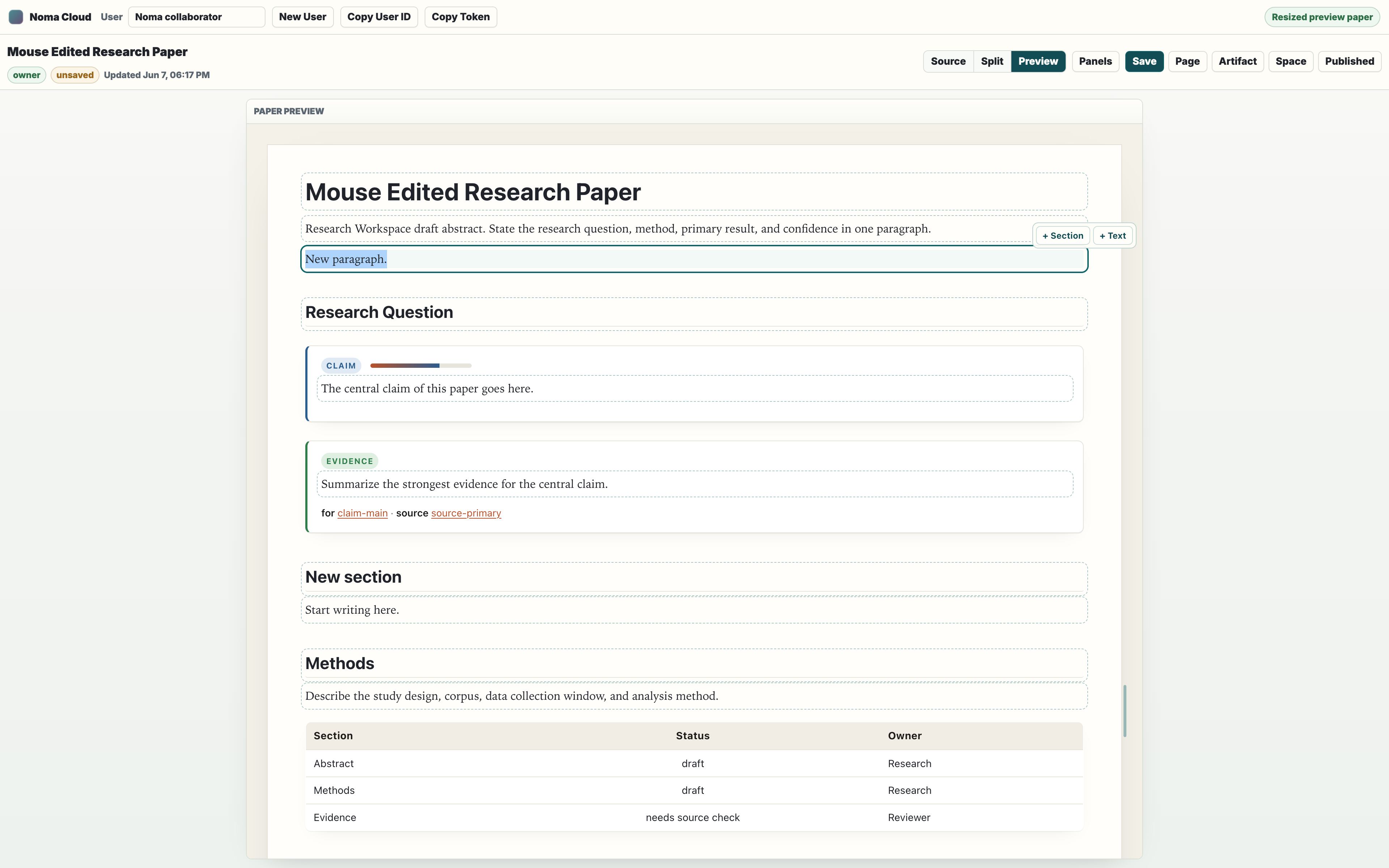
Scientific-paper workflow
For papers and technical research, keep each reviewable idea in an addressable block:
| Need | Noma structure |
|---|---|
| Abstract | ::abstract{id="abstract" status="draft"} |
| Main claim | ::claim{id="claim-main" confidence=0.72} |
| Evidence | ::evidence{id="evidence-primary" for="claim-main" source="source-id"} |
| Counterpoint | ::counterevidence{for="claim-main" source="source-id"} |
| Method note | normal heading plus prose, or a typed directive if the method needs metadata |
| Table | pipe table or ::table{id="..." header} |
| Figure | ::figure{id="..." src="..." alt="..." caption="..."} |
| Equation | inline math or ::math{id="..."} |
| Citation | ::citation{id="source-id" url="..." accessed="YYYY-MM-DD"} |
| References | ::bibliography{id="references"} |
| Review task | ::agent_task{id="task-source-check" scope="paper-review"} |
| Reviewer note | ::comment{id="comment-..." parent="claim-main" author="..."} |
| Proposed edit | ::change_request{id="cr-..." target="claim-main" action="replace" from="..." to="..."} |
This shape matters because collaborators and agents can target exactly claim-main, evidence-primary, or review-checklist instead of editing the whole document.
For journal or committee handoff, use the CLI from the saved source:
noma render paper.noma --to html --strict --out paper.html
noma render paper.noma --to pdf --out paper.pdf
noma render paper.noma --to docx --out paper.docx
noma docx-review-sync paper.noma reviewed-paper.docx --out paper.reviewed.noma --report review-sync.json
Cloud is the shared workspace. The CLI remains the strongest release path for PDF, DOCX, strict publishing, CI, and source-controlled review.
Share and permissions
Noma Cloud has three roles:
| Role | Can read | Can edit source | Can manage collaborators |
|---|---|---|---|
| Owner | yes | yes | yes |
| Editor | yes | yes | no |
| Viewer | yes | no | no |
Owners can invite another browser user by pasting that user's ID into Invite user ID and choosing viewer or editor. Space access is inherited by its pages, including pages created later. Owners can also invite a managed group; changing group membership immediately changes effective access without rewriting each page's permission list.
Share links are token-based:
| Button | What it copies or opens |
|---|---|
| Page Link | A cloud.html?doc=<id>&share=<token> editor or viewer link for one page. |
| Artifact | A rendered /d/<id>?share=<token> reader artifact for one page. |
| Space Link | A cloud.html?site=<id>&share=<token> link for the workspace editor/viewer shell. |
| Published | Opens a rendered /s/<id>?share=<token> multi-page reader site. |
Viewer links make the source readonly in the app. Editor links can save the page. API query endpoints do not accept share tokens for raw database access; they require a real Noma Cloud user token.
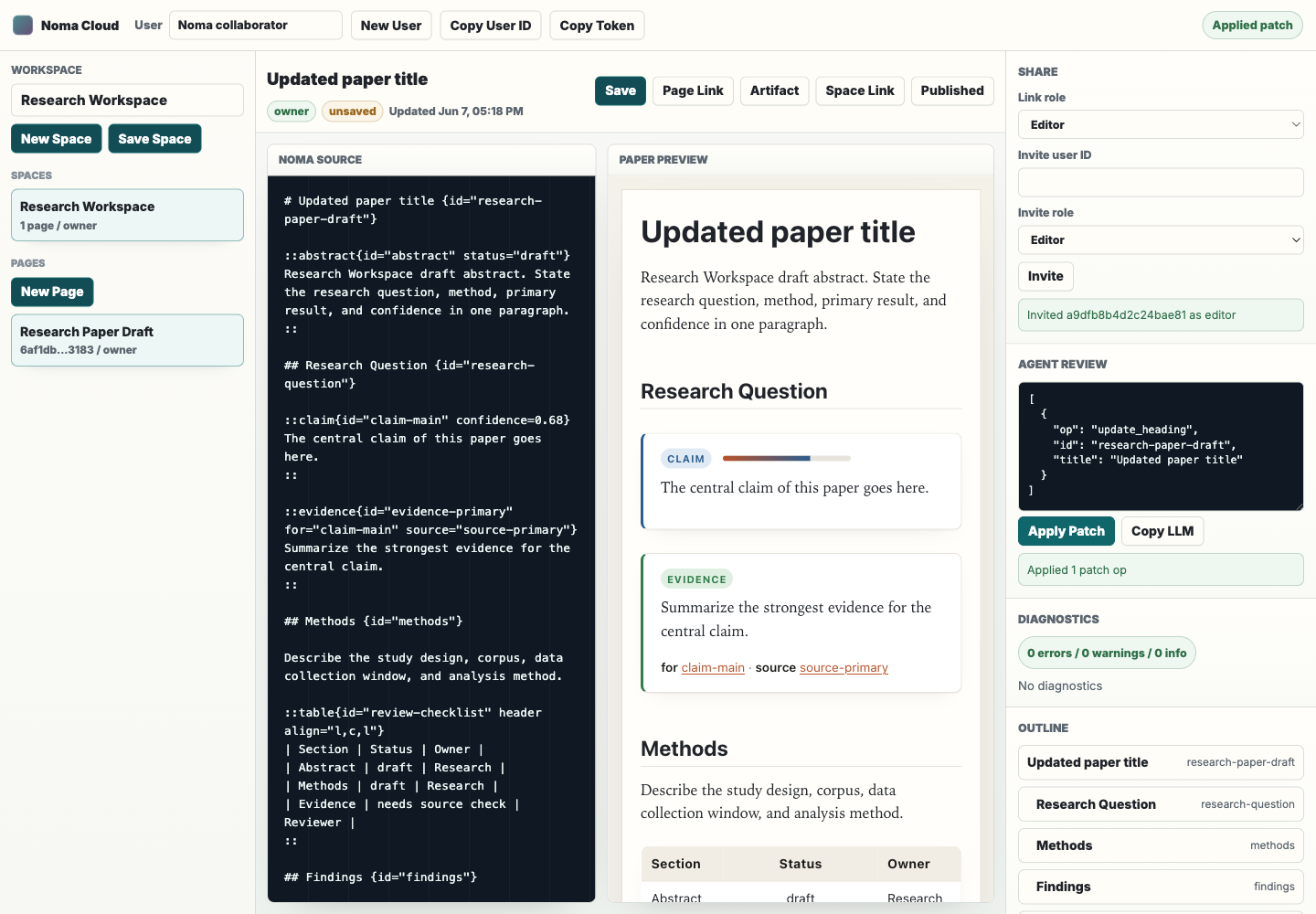
Proofed agent review linked to work
The Agent Review panel accepts one patch op or an array of patch ops in JSON. Preview in Draft runs a local parse/validation preview without saving. Propose for Review sends the operations to the server, where Noma creates a safety proof against the current saved document hash. If a Work issue is selected, the proposal and every later review/apply event are linked into that issue's immutable history.
The proof records pre/post hashes, patch result, diagnostics, stable IDs, source-preservation metrics, a compact diff, and a sandboxed post-patch artifact preview. A different editor must approve the proposal. Apply re-runs the proof against the current source and rejects the proposal if a human or agent changed the document after it was proposed. Self-approval, failed proofs, unapproved apply attempts, and stale versions are blocked.
Example:
[
  {
    "op": "replace_body",
    "id": "claim-main",
    "content": "The revised central claim goes here."
  }
]
Common ops:
| Op | Use it for |
|---|---|
replace_body | Rewrite a directive body without touching attrs or neighbors. |
update_heading | Rename a heading while preserving its stable ID. |
update_attribute | Change metadata such as confidence, status, owner, or accessed. |
add_comment | Add a targeted review note after the reviewed block. |
resolve_comment | Mark a comment resolved without deleting history. |
update_table_cell | Patch one table cell by row and column/header. |
insert_table_row | Add one row to an ID-bearing table. |
rename_id | Rename a block ID and retarget references. |
Use Copy LLM to copy deterministic LLM context for the current page. That context strips unsafe escape hatch bodies and keeps block IDs visible so an agent can propose a focused patch transaction.
The same review gate is available to API clients:
GET|POST /api/documents/<id>/patch-proposals
GET      /api/documents/<id>/patch-proposals/<proposal-id>
POST     /api/documents/<id>/patch-proposals/<proposal-id>/review
POST     /api/documents/<id>/patch-proposals/<proposal-id>/apply
Create proposals with { "ops": [...], "issueId": "optional-issue-id" }. Review with { "decision": "approved" } or "rejected". The document and linked issue both receive auditable proposed, approved/rejected, and applied events.
Published sites and artifacts
Use Artifact when you want one page as a reader artifact. Use Published when the workspace should become a multi-page reader site with page navigation.
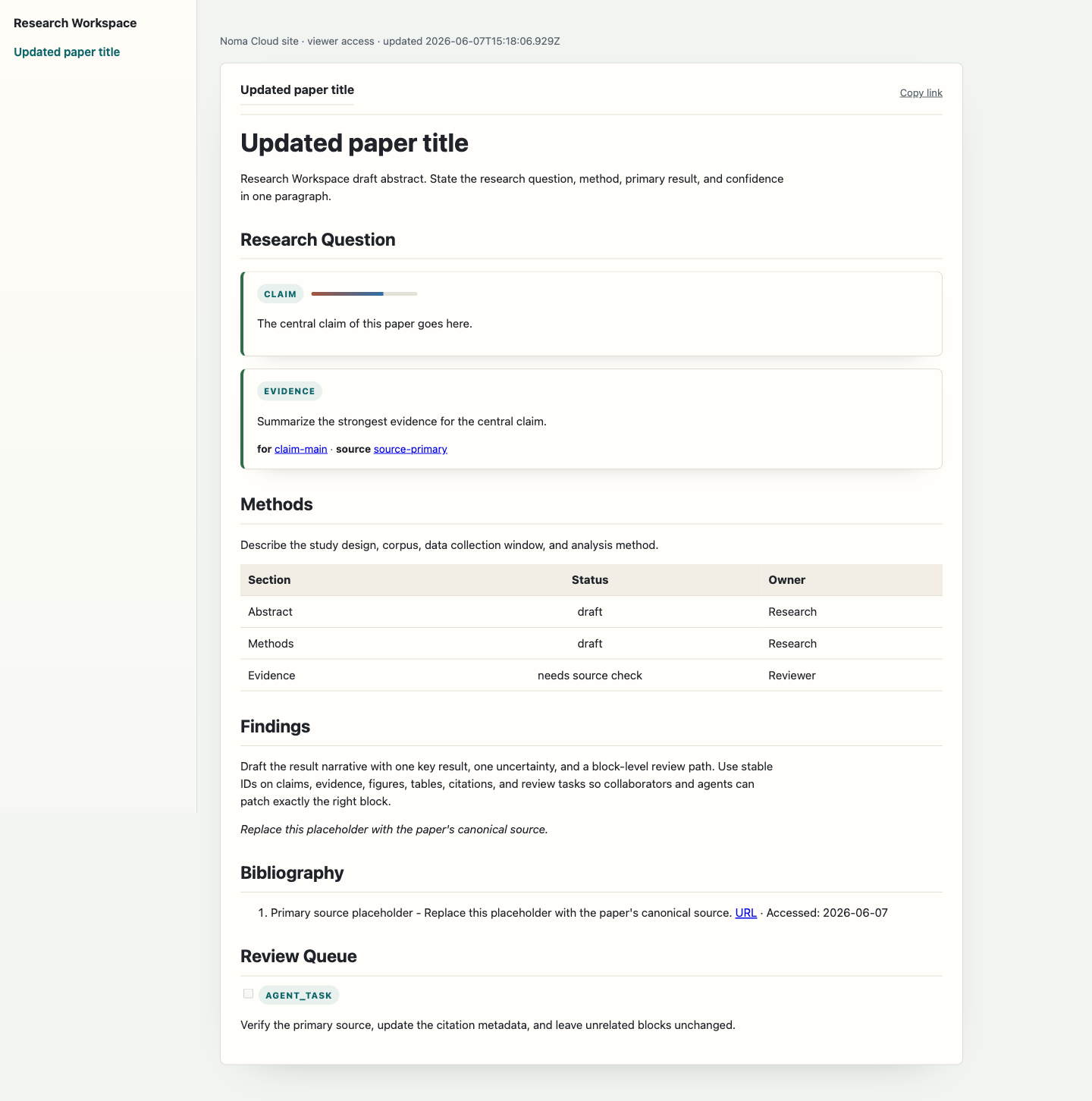
These routes are generated from the same saved source:
| Route | Purpose |
|---|---|
/cloud.html?site=<id> | Editable workspace shell. |
/cloud.html?doc=<id> | Editable or readonly single-page shell. |
/d/<id> | Rendered single-page artifact. |
/s/<id> | Rendered workspace site. |
/api/documents/<id>/html | Rendered HTML for one document (inline, macros resolved). |
/api/documents/<id>/llm | LLM context for one document, with included content and provenance comments. |
/api/documents/<id>/json | JSON AST for one document. |
/api/documents/<id>/export?to=<format> | Download one document as pdf, docx, markdown, html, noma, llm, or json. |
/api/sites/<id>/export?to=<format> | Download a whole space as a static HTML site (site-zip) or as .noma sources (noma-zip). |
Query the DB API
The DB API is intentionally not raw SQL. It is a bounded JSON query surface for future plugins and agent tools.
Read the available resources:
curl -H "authorization: Bearer $NOMA_TOKEN" \
  http://localhost:3000/api/db/schema
Query blocks:
curl -X POST \
  -H "authorization: Bearer $NOMA_TOKEN" \
  -H "content-type: application/json" \
  -d '{"resource":"blocks","q":"claim","limit":10}' \
  http://localhost:3000/api/db/query
Query documents in a workspace:
curl -X POST \
  -H "authorization: Bearer $NOMA_TOKEN" \
  -H "content-type: application/json" \
  -d '{"resource":"documents","siteId":"site-id","limit":20}' \
  http://localhost:3000/api/db/query
Resources:
| Resource | What it returns |
|---|---|
documents | Documents visible to the authenticated user. |
sites | Workspaces visible to the authenticated user. |
blocks | Indexed headings and directive blocks from visible documents. |
users | Public user lookup for collaboration workflows. |
Every result is filtered by the caller's Noma Cloud permissions. Tokens copied from share links are for document/site access, not database inspection.
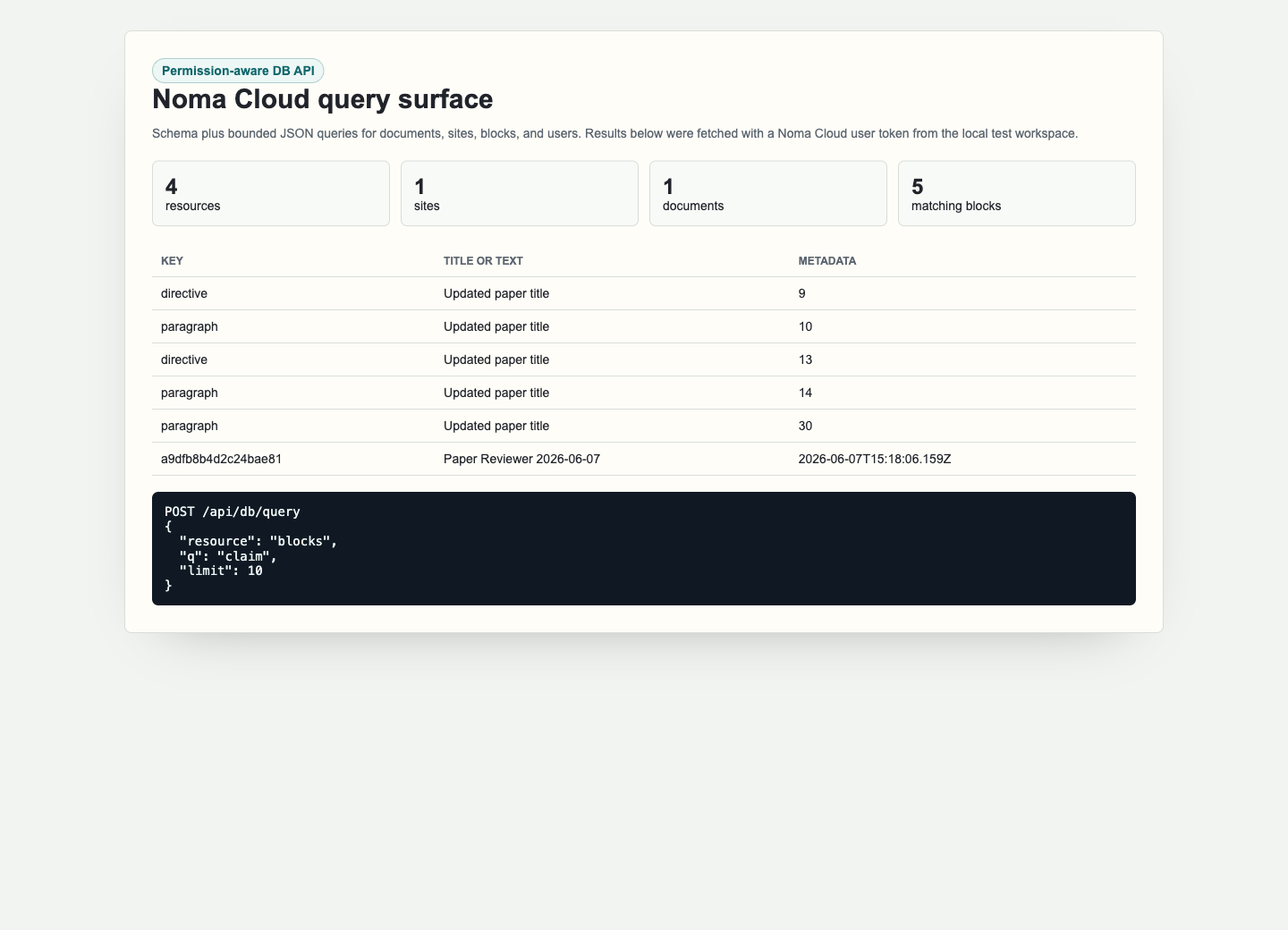
Mobile and tablet use
On small screens the app stacks the top bar, workspace rail, editor, preview, and inspector vertically. This is useful for review and light editing. Long authoring sessions are still better on desktop because the source and preview can remain side by side.
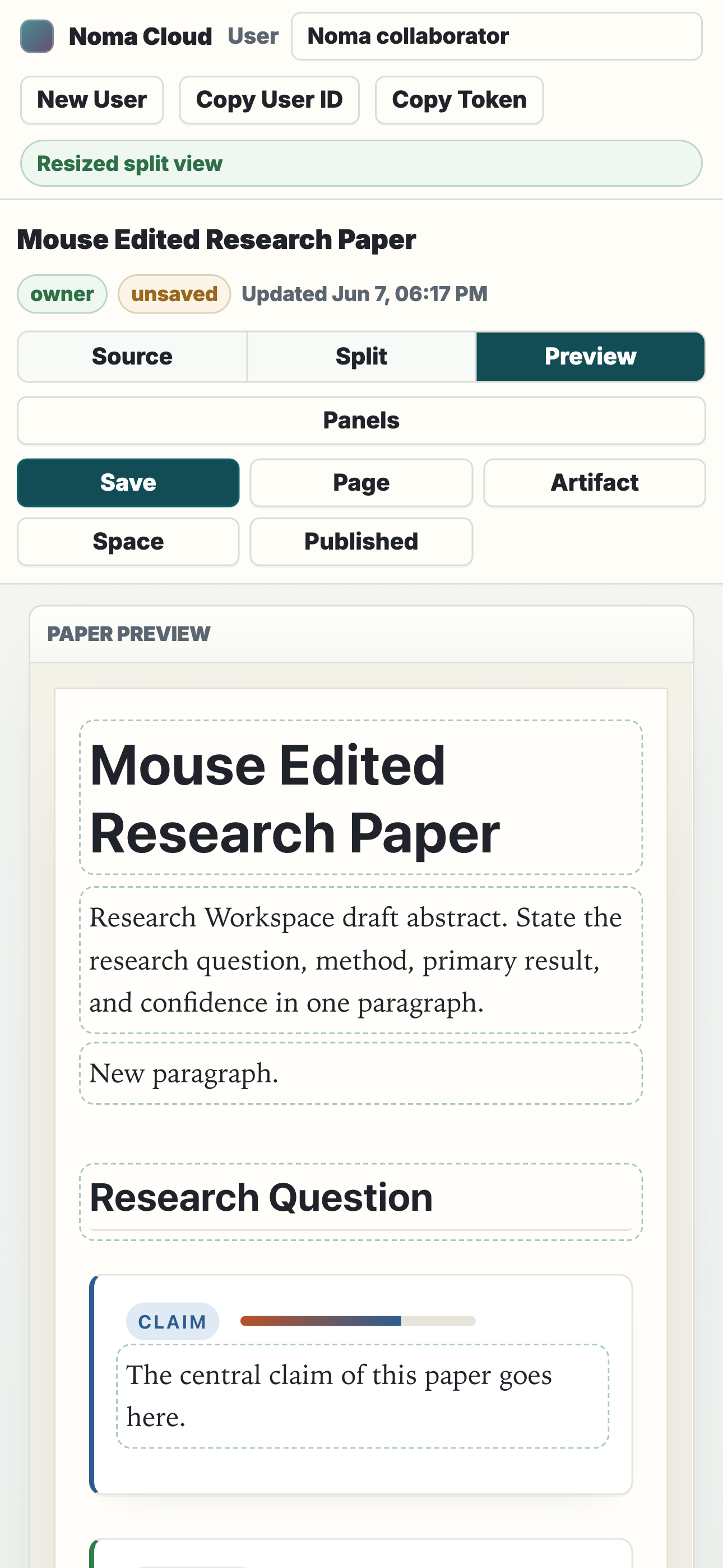
Safety model
Noma Cloud follows the same safety posture as the workbench:
- the preview runs in a sandboxed iframe
- raw
::htmland::svgblocks with anidrender as sandboxed widget iframes. Published pages run their scripts in an opaque origin with no network access. The editor preview shows the saved widget with scripts inert.::scriptis always blocked - external figure, math, diagram, and Plotly loads are disabled in preview
- permissions are checked on document, site, export, share, collaborator, and DB endpoints
- group grants are resolved dynamically and participate in the same permission checks
- approvals and agent patch proposals are bound to immutable document hashes
- agent patches are re-proofed after independent review and immediately before apply
- share links are role-scoped and token-based
- DB queries are resource-bounded and permission-aware, not arbitrary SQL
- request bodies have size limits
- server-side render paths escape user source before artifact output
- rendered links, buttons, datasets, and citations drop
javascript:,data:, and other script-capable URL schemes - published artifacts are served with a CSP
sandbox, so page scripts run on an opaque origin - browser sessions live in an HttpOnly
noma_sessioncookie; no raw token is kept inlocalStorage, and cookie-authenticated writes require theX-Noma-CSRFheader - personal access tokens are hashed at rest, scoped (
read,write,admin), expiring, and revocable; revoking one ends the sessions opened with it - token previews are visible only to their owner (
/api/users,/api/db/query) - workspace-wide enterprise settings require a workspace admin: the IDs in
NOMA_CLOUD_ADMIN_USER_IDS; production fails closed without it, and development falls back to the first user ever registered ?access=gate-token checks are rate limited on every path- backup imports are validated in full and written in one transaction without revealing which inaccessible IDs exist
- legacy JSON records are moved out of the data directory to
legacy-imported-<timestamp>/after their one-time SQLite import - adding an existing page to a space requires owner access on the page
- agent grants never exceed the agent owner's current access
- hosted patch proofs never read
::dataset{src=...}files from the server
For repository changes, run:
npx tsc --noEmit
npm test
npm run build:site
For browser acceptance, verify owner, editor, viewer, page edit, site edit, group inheritance, comments, mentions, notifications, approvals, project/issue workflows, sprint carry-over, issue-linked patch review, share links, published site, artifact export, DB schema/query, diagnostics, mobile layout, and XSS payload handling.
Troubleshooting
| Problem | Check |
|---|---|
| Save is disabled | Your current role is viewer, the server is busy, or no page is selected. |
| New Page is disabled | You need an editor or owner role on the workspace. |
| Invite is disabled | Only owners can invite collaborators. |
| Published page is old | Save the page before copying/opening a published link. |
| DB query returns empty results | Confirm the bearer token belongs to a user with access to the workspace or document. |
403 csrf_required from a script | Send a bearer token instead of the browser cookie, or echo the noma_csrf cookie in X-Noma-CSRF. |
403 insufficient_scope | The personal access token lacks write (mutations) or admin (/api/enterprise); create one with the needed scopes. |
403 admin_not_configured | Set NOMA_CLOUD_ADMIN_USER_IDS on the production server and restart it. |
| A patch fails | Use a smaller patch op, verify the target ID in the outline, and fix validation errors before saving. |
| A collaborator cannot edit | Invite their user ID as editor or create an editor share link. |
Noma Cloud is the collaboration layer. The .noma source, renderer outputs, block IDs, validator, proof/patch ops, and CLI remain the durable product contract underneath it.
For the market evidence and the next agent-human knowledge roadmap -- including block-native RAG, Ask Noma, LLM Wiki maintenance, scoped agent identities, knowledge health, connectors, and offline/realtime sequencing -- see Agent-Human Knowledge Platform Research and PLAN.md §26.
Comment editing, reactions, and quoted text
Comments are threads anchored to the page, a block, or an exact quote.
editedAt; the UI shows edited. Mentions added by an edit notify.deleted: true.resolvedAt.anchor: {blockId, quote, prefix, suffix}and the preview highlights the quoted text.The quote must appear in the block's rendered text when the comment is created. When later edits remove it, the comment is kept and returned with
outdated: true; the UI strikes the quote through and stops highlighting it.The same routes exist under
/api/sites/<site-id>/documents/<page-id>/comments.